Forum Discussion

CM1927
Feb 26, 2024Copper Contributor
Help Needed with Unique Filter Formula
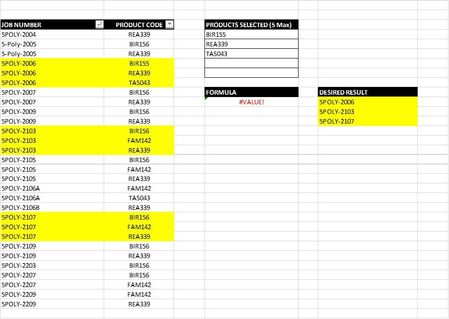
Hello Excel Forum, I am having problems creating a unique filter formula the uses multiple criteria. My data is set up in following two columns: - Job Number - Product Code Up to 5 diff...
- Feb 27, 2024
CM1927 sorry we didn't understand what you needed. If i understand correctly now, you want to only return items that ONLY have those criteria items and ALL of those criteria items. this is a little harder and the formula a bit more complicated but with office 365 this should work:
=LET(names,A4:A19,codes,B4:B19,criteria,D4:D6,
UNIQUE(FILTER(names,BYROW(names,LAMBDA(a,IFERROR(PRODUCT(--(SORT(UNIQUE(FILTER(codes,names=a)))=SORT(criteria))),0))),"")))

m_tarler
Feb 27, 2024Bronze Contributor
CM1927 sorry we didn't understand what you needed. If i understand correctly now, you want to only return items that ONLY have those criteria items and ALL of those criteria items. this is a little harder and the formula a bit more complicated but with office 365 this should work:
=LET(names,A4:A19,codes,B4:B19,criteria,D4:D6,
UNIQUE(FILTER(names,BYROW(names,LAMBDA(a,IFERROR(PRODUCT(--(SORT(UNIQUE(FILTER(codes,names=a)))=SORT(criteria))),0))),"")))
