Forum Discussion

geminiwwwww20
Jan 12, 2022Copper Contributor
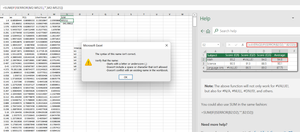
Having this trouble when applying the sum formula
Does anyone can help me to solve this prob?

NowshadAhmed
Jan 12, 2022Iron Contributor
You are using and IF function within a SUM function, which is causing this error. In your formula the function SUM is seeing your IF statement as another number to sum (which isn't).
I see that you have a criteria for SUM. What you need here is SUMIF or SUMIFS.
I see that you have a criteria for SUM. What you need here is SUMIF or SUMIFS.
 geminiwwwww20Jan 12, 2022Copper ContributorHi, I’m using =SUM(AA:BB) in the beginning but it showed #VALUE!
So, I press the HELP button, it showed these solution ( refer to the picture above) but it not works.- Riny_van_EekelenJan 12, 2022Platinum Contributor
geminiwwwww20 Note that your formula has three apostrophes ( ''' ),
rather than the two quote marks ( "" ) as indicated in the help screen.
That should fix it.
- NowshadAhmedJan 12, 2022Iron Contributor
Do you have valid Data in AA to BB?
Try this in place of the formula you are currently using (shown in the picture in cell N2):
SUMIF(M2:M521,"<>ISERROR("&M2:M521&")",M2:M521)
