Forum Discussion

shotgun-68
Jun 23, 2020Copper Contributor
Get Macro to copy/paste values only after running in what was active cell
I have a pretty basic macro to create a unique ID for a sales file Once it's done that , I want to copy then paste special (values only) to hard wire the random ID However , it does the fir...
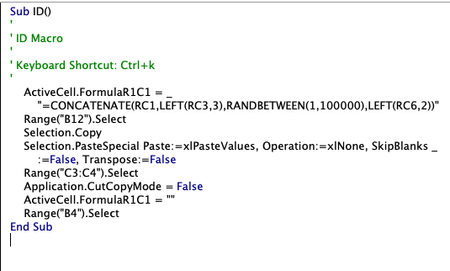
- Jun 23, 2020
shotgun-68 Instead of Range("B12").Select use ActiveCell.Select . That should work, though, I've not been able to test it.


Charla74
Jun 23, 2020Iron Contributor
Rather than copy/paste to overwrite a formula, simply convert to value. I assume, since there is no cell selection preceding the code, that you select where the formula will be inserted manually before running the code (if not, this should be added) - try below:
Sub ID()
'
'ID Macro
'
'Keyboard Shortcut: Ctrl+k
'
ActiveCell.FormulaR1C1 = _
"=Concatenate(rc1,left(rc3,3),randbetween(1,100000),left(rc6,2))"
ActiveCell.Value = ActiveCell.Value
Range("C3:C4").Select
Application.CutCopyMode = False
ActiveCell.FormulaR1C1 = ""
Range("B4").Select
End Sub