Forum Discussion

FORMULAS IN EXCEL
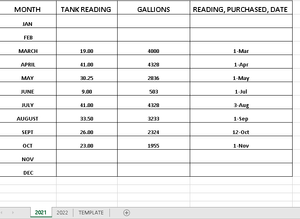
- Nov 02, 2021
If you name the lookup table to be 'dataTable' then you can generate indices from the measurement in inches
= INDEX(dataTable,
    1 + MOD(inches-1,24),
    2 + 3*QUOTIENT(inches-1,24)
  )
If you are fortunate enough to be using Excel 365, it can be tidied up a bit to read
= LET(
    row,   1 + MOD(inches-1, 24),
    block, 1 + QUOTIENT(inches-1, 24),
    INDEX(dataTable, row, 3*block-1)
  )


The most likely problem may be defining and referencing named ranges. In my preferred solution it would also help to be familiar with the LET function.
- MMONUSNov 03, 2021Copper Contributor
- PeterBartholomew1Nov 03, 2021Silver Contributor
- MMONUSNov 04, 2021Copper ContributorYou are my hero! Thank you so much!
- SergeiBaklanNov 03, 2021Diamond Contributor
- MMONUSNov 03, 2021Copper Contributorthat's awesome!
I was hoping to be able to enter the tank readings (in whole numbers) and have the gallons auto populate using a formula of some sort...
- SergeiBaklanNov 03, 2021Diamond Contributor
Sorry I jump in, just logic is not clear.
If we have 30.25 inches shall we return value proportionally in between 2836 and 2967 gallons, or round inches as in the sample?
If round, when how, e.g. in the sample for 33.5 inches gallons are taken for 33 inches (default rounding gives 34 inches for 33.5).
Other words, bit more business logic.
- PeterBartholomew1Nov 03, 2021Silver Contributor
I had also noticed that and thought of inserting INT. In the event, I simply allowed INDEX to truncate the number of inches.
I like the curve fit. Now I could differentiate to determine the surface area and square-root for the radius. Then draw the tank.
