Forum Discussion

MMONUS
Nov 02, 2021Copper Contributor
FORMULAS IN EXCEL
I am trying to enter a formula onto sheet 1 of my spreadsheet so that if a certain measurement in inches is entered it will translate that into gallons based info located on sheet 3. Is there any suc...
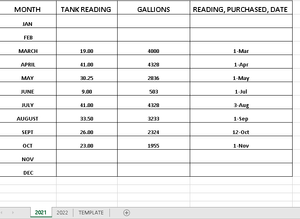
- Nov 02, 2021
If you name the lookup table to be 'dataTable' then you can generate indices from the measurement in inches
= INDEX(dataTable,
    1 + MOD(inches-1,24),
    2 + 3*QUOTIENT(inches-1,24)
  )
If you are fortunate enough to be using Excel 365, it can be tidied up a bit to read
= LET(
    row,   1 + MOD(inches-1, 24),
    block, 1 + QUOTIENT(inches-1, 24),
    INDEX(dataTable, row, 3*block-1)
  )

PeterBartholomew1
Nov 02, 2021Silver Contributor
If you name the lookup table to be 'dataTable' then you can generate indices from the measurement in inches
= INDEX(dataTable,
    1 + MOD(inches-1,24),
    2 + 3*QUOTIENT(inches-1,24)
  )
If you are fortunate enough to be using Excel 365, it can be tidied up a bit to read
= LET(
    row,   1 + MOD(inches-1, 24),
    block, 1 + QUOTIENT(inches-1, 24),
    INDEX(dataTable, row, 3*block-1)
  )
MMONUS
Nov 03, 2021Copper Contributor
I am using microsoft 365 and I converted the info on my sheet 3 to a table and also made it all 1 column instead of 4 columns. So now, my inches of fuel are all in column A and the gallons they convert to are in column B