Forum Discussion

Formulas do not calculate after using Office Script
- Aug 25, 2023
setValue into C5 puts the value, which is string, into that cell. You shall to set the formula, like
    workbook
        .getActiveWorksheet()
        .getRange("C5")
        .setFormula("=CONCATENATE(B5,A5")

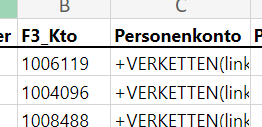
Before changing the format, I only see the formula. The origin table is completely formatted as text.
The formula is part of the script. I need to transform row B by eliminating 2 characters so I use Left () and Right() to extract the appropriate number of characters and join them. The script enters more formulas to include information I need. I have the same problem with all formulas.
This also happens when I use = instead of + (in options I have chosen that + triggers the same response as = when I begin a formula with it).

I tried on such sample
Script
function main(workbook: ExcelScript.Workbook) {
    const range = workbook
        .getActiveWorksheet()
        .getRange("B1:B4")

    const t = range
        .getValues()
        .map((x) => Array.of(x.toString()) )
    range.setNumberFormat("General")
    range.setFormulas(t)
}
get text of formulae, combine them as array, apply Genera format to the same range and apply formulae to them. When it works
But above is only the idea. Script works on columns only, otherwise we shall to build array of formulae another way. And if we run it second it converts returned first time formulae into values. Thus we need to check if the text represents formulae (starts from "=" or "+") or not. Perhaps to do that on cell by cell basis or some other way, not sure right now.
To illustrate that format only is not enough.