Forum Discussion

Formula to search multiple tabs and return a count
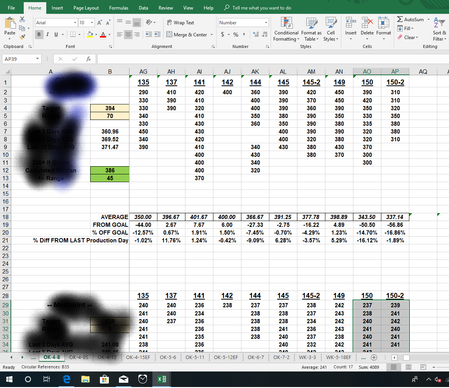
- Jun 01, 2018
David-
Using your TEST.xlsx file this VBA Code appears to yield the correct results (See Below Code):
End Result after VBA Code is executed:
I have commented the code for better understanding.... it may need to be modified based on the way your file is set up:
Sub GetRecipeCounts()

    Dim ProdLrow As Integer
    Dim ColLp As Integer
    Dim RecipeDay As String
    Dim RecipeCount As Integer

    'Define last row on Production sheet based on column A
    ProdLrow = Sheets("PRODUCTION").Cells(Rows.Count, "A").End(xlUp).Row

    'Loop through values on the PRODUCTION Sheet in Column A
    For intLp = 2 To ProdLrow

        'Define Day to look for...Note this is a strinf because some of your days have -X in them..
        RecipeDay = Sheets("PRODUCTION").Cells(intLp, "A")

        'Loop through Worksheets
        For Each Worksheet In ThisWorkbook.Worksheets

            'Skip over PRODUCTION worksheet...b/c there is no data on it
            If Worksheet.Name <> "PRODUCTION" Then

                '3 to 702 represents Column C to Column ZZ
                For ColLp = 3 To 702

                    'Look through first set of values in Row 1
                    'Note we use the left function to get the first 3 characters....
                    If Left(Worksheet.Cells(1, ColLp), 3) = RecipeDay Then
                        'Get count for RecipeDay... note 2 and 17 stand for the rows
                        'ColLp signifies the Column the RecipeDay was found....
                        'We also need to add it to the prior value in case it's the second instance....
                        RecipeCount = RecipeCount + Application.CountA(Worksheet.Range(Worksheet.Cells(2, ColLp), Worksheet.Cells(17, ColLp)))
                    End If

                    'Look through the second set of values on row 28
                    If Left(Worksheet.Cells(28, ColLp), 3) = RecipeDay Then
                        'Get count for RecipeDay... note 29 and 44 stand for the rows
                        'ColLp signifies the Column the RecipeDay was found....
                        'We also need to add it to the prior value in case it's the second instance....
                        RecipeCount = RecipeCount + Application.CountA(Worksheet.Range(Worksheet.Cells(29, ColLp), Worksheet.Cells(44, ColLp)))
                    End If

                Next ColLp

            End If

        Next Worksheet

        'Input the counts to the PRODUCTION worksheet
        Sheets("PRODUCTION").Cells(intLp, "B") = RecipeCount

        'Reset the RecipeCount for next Loop....i.e. next RecipeDay
        RecipeCount = 0

    Next intLp

End Sub
If you are unfamiliar how to use VBA Code you can use this link as a reference:
http://www.contextures.com/xlvba01.html
Hope this helps. Please let me know if you need further assistance.

I have made a test spreadsheet example. I appreciate your helping me.
The data would be consistent. All sheet have the same format and the search parameters would be the same on each sheet. It would go from C1 to PZ1. It would have to count down 16 cells to get all the batch data (C2 thru C17)

David-
Using your TEST.xlsx file this VBA Code appears to yield the correct results (See Below Code):
End Result after VBA Code is executed:
I have commented the code for better understanding.... it may need to be modified based on the way your file is set up:
Sub GetRecipeCounts()

    Dim ProdLrow As Integer
    Dim ColLp As Integer
    Dim RecipeDay As String
    Dim RecipeCount As Integer

    'Define last row on Production sheet based on column A
    ProdLrow = Sheets("PRODUCTION").Cells(Rows.Count, "A").End(xlUp).Row

    'Loop through values on the PRODUCTION Sheet in Column A
    For intLp = 2 To ProdLrow

        'Define Day to look for...Note this is a strinf because some of your days have -X in them..
        RecipeDay = Sheets("PRODUCTION").Cells(intLp, "A")

        'Loop through Worksheets
        For Each Worksheet In ThisWorkbook.Worksheets

            'Skip over PRODUCTION worksheet...b/c there is no data on it
            If Worksheet.Name <> "PRODUCTION" Then

                '3 to 702 represents Column C to Column ZZ
                For ColLp = 3 To 702

                    'Look through first set of values in Row 1
                    'Note we use the left function to get the first 3 characters....
                    If Left(Worksheet.Cells(1, ColLp), 3) = RecipeDay Then
                        'Get count for RecipeDay... note 2 and 17 stand for the rows
                        'ColLp signifies the Column the RecipeDay was found....
                        'We also need to add it to the prior value in case it's the second instance....
                        RecipeCount = RecipeCount + Application.CountA(Worksheet.Range(Worksheet.Cells(2, ColLp), Worksheet.Cells(17, ColLp)))
                    End If

                    'Look through the second set of values on row 28
                    If Left(Worksheet.Cells(28, ColLp), 3) = RecipeDay Then
                        'Get count for RecipeDay... note 29 and 44 stand for the rows
                        'ColLp signifies the Column the RecipeDay was found....
                        'We also need to add it to the prior value in case it's the second instance....
                        RecipeCount = RecipeCount + Application.CountA(Worksheet.Range(Worksheet.Cells(29, ColLp), Worksheet.Cells(44, ColLp)))
                    End If

                Next ColLp

            End If

        Next Worksheet

        'Input the counts to the PRODUCTION worksheet
        Sheets("PRODUCTION").Cells(intLp, "B") = RecipeCount

        'Reset the RecipeCount for next Loop....i.e. next RecipeDay
        RecipeCount = 0

    Next intLp

End Sub
If you are unfamiliar how to use VBA Code you can use this link as a reference:
http://www.contextures.com/xlvba01.html
Hope this helps. Please let me know if you need further assistance.
- David SpearsJun 01, 2018Copper Contributor
Holy Bill Gates!, I was way off on thinking it was a formula. That does work, and its awesome! Thank you so much!
- Matt MickleJun 01, 2018Bronze Contributor
David-
Glad you were able to get it working. There may be a formula out there that could help you. However, I believe you would have to rename your worksheets, reorganize them, and add some helper calculations. As you can see in this example, if sheets are numbered in a specific manner it can be done:
However, I'm partial to VBA code route and find it to be a great extension of the native Excel functionality, which can be used to accomplish almost any task you can imagine.