Forum Discussion

cheherr
Dec 15, 2023Copper Contributor
Formula Help
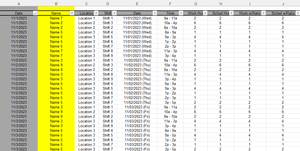
Hi! I am updating a template that the company uses. The current template looks at the data set and returns 2 unique employee name that worked for that specific day. I need to update the template ...

HansVogelaar
Dec 15, 2023MVP
If you have Microsoft 365 or Office 2021, you can use a single formula to return all names:
=FILTER(Data!B:B, Data!A:A=A3, "")
 cheherrDec 15, 2023Copper ContributorI do have Microsoft 365 but for some reason that formula does not work 😞
- HansVogelaarDec 15, 2023MVP
Could you attach a small sample workbook demonstrating the problem (without sensitive data), or if that is not possible, make it available through OneDrive, Google Drive, Dropbox or similar?