Forum Discussion

need help with a formula to place an X in a cell when values in another column reach multiples of 7
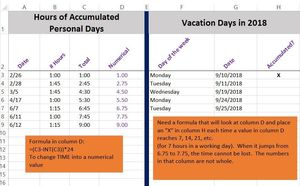

Hi Renee,
On my own sheet, it works just fine as the below screenshot.
So, please check each of the following:
- Copy the formula as it is into the cell H3, and then fill it down using the https://support.office.com/en-us/article/display-or-hide-the-fill-handle-80918200-9ae9-4615-93c9-13d4f1496f81 which is this:

- Make sure that the calculation option is set to Automatic as follows:
- Make sure that the unused cells under cell D9 are completely blank because any non-numeric data will affect the result
It does work! This is really great. I have to take it apart and understand how this works. I really appreciate it!
One last thing - you mentioned that anything after D9 has to be blank.
But this is meant to be a running spreadsheet. What do we do?
Can we have an option where it will just keep going? Every time a multiple of 7 is reached in Column D, it places another X in column H... ?
Thank you!
- Haytham AmairahJun 15, 2018Silver Contributor
Hi,
Not exactly anything after D9 has to be blank, it just the non-numeric data.
The formula already will just keep going so that every time a multiple of 7 is reached in Column D, it places another X in column H, but this in case if the new value in column D is within the range specified in the formula.
For example, in the formula I suggested the range is D3:D10, so any value within this range, the formula will take it into account.
You can expand the range as you want.