Forum Discussion

michaelFoug
Sep 18, 2019Copper Contributor
Excel Web chart Waterfall
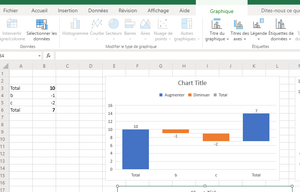
Hey, I have Excel Web Office365 and wanted to use Waterfall Chart but i have 3 categories automatically detect : increase (blue), decrease (orange) and total (grey). But the last Total, did no...

SergeiBaklan
Sep 19, 2019Diamond Contributor
You are welcome.
First, that's for desktop version of Excel, I'm not sure that could be done in Excel Online.
Click on any column of your chart (better on right one) - data series will be selected
Now two variants. Click again on this column (single click), after that on ribbon select Format section and next click on Format selection
Another option just double click on this column.
In both cases right pane shall appear with options to format data point, here check Set as total
In brief, you shall select last data point and format it as total. Finally
SergeiBaklan
Sep 19, 2019Diamond Contributor
And finally I'm very sorry, I missed you asked for Excel Online. Will check if possible to total in it.
 michaelFougSep 20, 2019Copper ContributorThanks Sergei,
I'm ok with u for post but i can't find the same for excel web ;
You can test on the share excel link i posted :
https://pochet-my.sharepoint.com/:x:/g/personal/mickael_fougeres_groupe-pochet_fr/Eba9E_GrxhxOsH5EIFxz4SsBVaBSmyXWk_V_w7pMiGFxvQ?e=YM5aC9
;-))