Forum Discussion

Excel VBA to merge cell with different font style
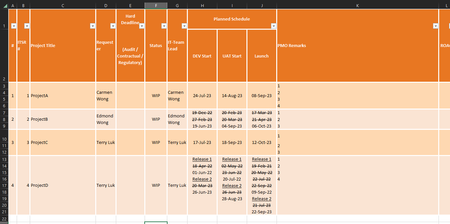

To merge cells with different font styles while preserving the formatting in Excel VBA, you can use the following approach:
Sub MergeCellsAndPreserveFormatting()
    Dim ws As Worksheet
    Dim lastRow As Long
    Dim i As Long

    ' Set the worksheet to the appropriate one
    Set ws = ThisWorkbook.Sheets("Generated")

    ' Find the last row in Column A
    lastRow = ws.Cells(ws.Rows.Count, "A").End(xlUp).Row

    ' Loop through rows
    For i = lastRow To 3 Step -1
        If ws.Cells(i, 1).MergeCells Then
            ' Check if the cell in Column A is part of a merged cell

            ' Copy the content of the merged cell
            ws.Cells(i, 8).Value = ws.Cells(i, 8).MergeArea(1, 1).Value
            ws.Cells(i, 9).Value = ws.Cells(i, 9).MergeArea(1, 1).Value
            ws.Cells(i, 10).Value = ws.Cells(i, 10).MergeArea(1, 1).Value
            ws.Cells(i, 11).Value = ws.Cells(i, 11).MergeArea(1, 1).Value

            ' Unmerge the cell
            ws.Cells(i, 1).MergeArea.UnMerge
        End If
    Next i
End Sub
The code serves as an example, changes or adjustments may be necessary.
This VBA code loops through the rows and checks if the cell in Column A is part of a merged cell. If it is, it copies the content of the merged cell to the respective columns (H, I, J, K) while preserving the formatting. Then, it unmerges the cell in Column A.
Make sure to adjust the column references and worksheet name to match your specific setup. Also, be cautious and back up your data before running macros, especially when modifying cell contents. The text and steps were created with the help of AI.
My answers are voluntary and without guarantee!
Hope this will help you
Was the answer useful? Mark them as helpful!
This will help all forum participants.
 Lister1220Sep 05, 2023Copper ContributorHi @NikeolinoDE, the code you wrote only unmerged the first column of my table.
- NikolinoDESep 06, 2023Platinum Contributor
The code serves as an example, changes or adjustments may be necessary.
- Lister1220Sep 10, 2023Copper Contributor
I have come all the way to the final stage, but one thing that i am trying to solve now.
I attached my data below too.
When i try to run it line by line, i saw when it runs line 127 copy the date without strikethrough and paste it to the target cell, it removed the strikethrough for the strikethrough date too. but i am not sure why as my code is simply paste the value to the target cell and i expect it should follow the pervious strikethrough thats why my code unstrikethrough the date after pasting it to the target cell. but now it dont work because it DID NOT follow the pervious strikethrough format, it unstrikethrough the pervious date instead...
Before line 127 code: the Apr 18 date should be strikethrough and it is
After line 127 code: the Apr 18 date should be strikethrough and it is NOT
Sub Try1()

    Dim lastRow As Long, mergedRows As Long
    Dim i As Long, j As Long, k As Long

    Sheets("Generated").Select
    lastRow = Cells(Rows.Count, "A").End(xlUp).Row

    For i = 3 To lastRow
        mergedRows = Range("A" & i).MergeArea.Rows.Count

        If mergedRows > 1 Then
            For j = i + 1 To i + mergedRows - 1
                Dim L1 As Integer
                Dim L2 As Integer
                L1 = Len(Range("H" & i))
                L2 = Len(Range("H" & j))

                If Range("H" & i).Font.Strikethrough = True Then

                    If InStr(Range("H" & j), "Release") > 0 Then
                        Range("H" & j).Select
                        Range("H" & j).Activate
                        Call Clean_Formats
                        Range("H" & i).Value = Range("H" & i).Value & Chr(10) & Range("H" & j).Value
                        Dim L5 As Integer
                        L5 = Len(Range("H" & i))
                        Range("H" & i).Activate
                        With ActiveCell.Characters(Start:=L5 - L2 + 1, length:=L2).Font
                            .Strikethrough = False
                        End With

                    ElseIf Range("H" & j).Font.Strikethrough = True Then
                        Range("H" & j).Select
                        Range("H" & j).Activate
                        Call Clean_Formats
                        Range("H" & i).Value = Range("H" & i).Value & Chr(10) & Range("H" & j).Value
                        Dim L3 As Integer
                        L3 = Len(Range("H" & i))
                        Range("H" & i).Activate
                        With ActiveCell.Characters(Start:=L3 - L2 + 1, length:=L2).Font
                            .Strikethrough = True
                        End With

                    ElseIf Range("H" & j).Font.Strikethrough = False And L2 > 2 Then
                        Range("H" & i).Value = Range("H" & i).Value & Chr(10) & Range("H" & j).Value
                        Dim L4 As Integer
                        L4 = Len(Range("H" & i))
                        Range("H" & i).Activate
                        With ActiveCell.Characters(Start:=L4 - L2 + 1, length:=L2).Font
                            .Strikethrough = False
                        End With

                    ElseIf Range("H" & j).Font.Strikethrough = False And L2 < 2 Then
                        Range("H" & i).Value = Range("H" & i).Value

                    End If

                ElseIf Range("H" & i).Font.Strikethrough = False Then
                    If InStr(Range("H" & i), "Release") > 0 Then
                        Range("H" & i).Select
                        Range("H" & i).Activate
                        Call Clean_underline

                        If InStr(Range("H" & j), "Release") > 0 Then
                            Range("H" & j).Select
                            Range("H" & j).Activate
                            Call Clean_Formats
                            Range("H" & i).Value = Range("H" & i).Value & Chr(10) & Range("H" & j).Value
                            Dim L8 As Integer
                            L8 = Len(Range("H" & i))
                            Range("H" & i).Activate
                            With ActiveCell.Characters(Start:=L8 - L2 + 1, length:=L2).Font
                                .Strikethrough = False
                            End With
                        ElseIf Range("H" & j).Font.Strikethrough = True Then
                            Range("H" & j).Select
                            Range("H" & j).Activate
                            Call Clean_Formats
                            Range("H" & i).Value = Range("H" & i).Value & Chr(10) & Range("H" & j).Value
                            Dim L6 As Integer
                            L6 = Len(Range("H" & i))
                            Range("H" & i).Activate
                            With ActiveCell.Characters(Start:=L6 - L2 + 1, length:=L2).Font
                                .Strikethrough = True
                            End With

                        ElseIf Range("H" & j).Font.Strikethrough = False And L2 > 2 Then
                            Range("H" & i).Value = Range("H" & i).Value & Chr(10) & Range("H" & j).Value
                            Dim L7 As Integer
                            L7 = Len(Range("H" & i))
                            Range("H" & i).Activate
                            With ActiveCell.Characters(Start:=L7 - L2 + 1, length:=L2).Font
                                .Strikethrough = False
                            End With

                        ElseIf Range("H" & j).Font.Strikethrough = False And L2 < 2 Then
                            Range("H" & i).Value = Range("H" & i).Value

                        End If
                    End If
                Else
                    If InStr(Range("H" & j), "Release") > 0 Then
                        Range("H" & j).Select
                        Range("H" & j).Activate
                        Call Clean_Formats
                        Range("H" & i).Value = Range("H" & i).Value & Chr(10) & Range("H" & j).Value
                        Dim L11 As Integer
                        L11 = Len(Range("H" & i))
                        Range("H" & i).Activate
                        With ActiveCell.Characters(Start:=L11 - L2 + 1, length:=L2).Font
                            .Strikethrough = False
                        End With
                    ElseIf Range("H" & j).Font.Strikethrough = True Then
                        Range("H" & j).Select
                        Range("H" & j).Activate
                        Call Clean_Formats
                        Range("H" & i).Value = Range("H" & i).Value & Chr(10) & Range("H" & j).Value
                        Dim L9 As Integer
                        L9 = Len(Range("H" & i))
                        Range("H" & i).Activate
                        With ActiveCell.Characters(Start:=L9 - L2 + 1, length:=L2).Font
                            .Strikethrough = True
                        End With

                    ElseIf Range("H" & j).Font.Strikethrough = False And L2 > 2 Then
                        Range("H" & i).Value = Range("H" & i).Value & Chr(10) & Range("H" & j).Value
                        Dim L10 As Integer
                        L10 = Len(Range("H" & i))
                        Range("H" & i).Activate
                        With ActiveCell.Characters(Start:=L10 - L2 + 1, length:=L2).Font
                            .Strikethrough = False
                        End With

                    ElseIf Range("H" & j).Font.Strikethrough = False And L2 < 2 Then
                        Range("H" & i).Value = Range("H" & i).Value

                    End If
                End If
            Next j

            Range("A" & i).UnMerge
        End If
    Next i

    Range("A1").Select

End Sub
Sub Clean_Formats()

    Dim rng As Range
    Set rng = Selection

    rng.Activate
    With rng.Font
        .FontStyle = "Regular"
        .Strikethrough = False
        .Superscript = False
        .Underline = xlUnderlineStyleNone
        .ColorIndex = xlAutomatic
    End With

End Sub
Sub Clean_underline()

    Dim rng As Range
    Set rng = Selection

    rng.Activate
    With rng.Font
        .Underline = xlUnderlineStyleNone
    End With

End Sub