Forum Discussion

Brian Fergerson
Feb 27, 2017Copper Contributor
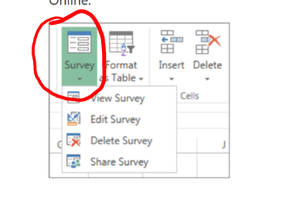
Excel Survey Option Missing from Excel Online
Some of our users have reported that they are no longer able to create Excel Surveys from within Excel Online. I've spot verified that the option does appear to be missing. I'm searching to see if th...

Hans van Rijsbergen
Mar 13, 2017Brass Contributor
Didn't solve it in our case. Tenant is configured as per article's requirements

Zhongzhong_Li Microsoft
Mar 13, 2017MicrosoftThe Excel survey has dependency on "external sharing / anonymous access links" feature. All the responders are actually anonymous users when they try to submit the survey, and that will requires them to have "edit" permission with the anonymous access link.
Could you check if you open the Excel workbook with the anonymous access link, do you have "edit" permission?
- Hans van RijsbergenMar 13, 2017Brass ContributorHi, external sharing / anonymous access is allowed. However the links created do expire after 60 days. Is it this 'intelligent' that it detects temporary links and therefore disables the survey features? I can create the survey itself via onedrive (new->excel survey) but then when opening it the survey ribbon button does not appear
- Zhongzhong_LiMar 14, 2017
And you have removed the check-out requirement?
To remove the check-out requirement, follow these steps:
- Browse to the affected library.
- On the LIBRARY tab of the ribbon, click Library Settings.
- In the General Settings section, click Versioning settings.
- Set the Require Check Out setting to No, and then click OK.
 RanjaniVenkat14Mar 09, 2020Copper Contributor
This suggestion works for me. I can able to see the "Survey" option in Excel Online after changing "Require Check Out" from "Yes" to "No".
But I am wondering how could this option works in this case?
Could you please clarify.
Thanks in advance.
- Zhongzhong_LiMar 13, 2017The "expire in x days" feature is also new for me, but I could double check. If you uncheck the "expire in x days" options, and enable "edit" permission for anonymous access link, does Excel survey feature work for you on both OneDrive (+new button) and Excel Online (entry point on ribbon)?