Forum Discussion

Excel row to column transfer
- Mar 12, 2023
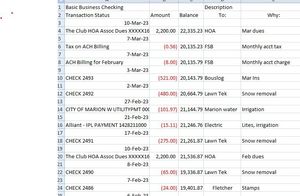
mikesuefle If this is a on-time task, I would do it manually. It takes less than a minute to achieve. I've assumed that the data is organised for all 500 row as your picture show. I.e. a date then one row, then a date and again one row etc.
1) Insert a column to the left of the data. Thus, everything shifts one column to the right and an empty column A appears.
2) In A2 enter the word Date
3) In A4 enter the formula =B3 and copy it all the way down.
4) Select entire column A, Copy and paste values onto itself
5) Put filter buttons on row 2
At this stage you should have something like this:
6) Press the filter button in B2 and select only the dates.
7) Select all visible rows with dates and delete the rows
😎 Clear the filter from B2
The end result should be like this:
Once you have upgraded to a newer version and if this is going to be recurring task you may want to look into Power Query to automate this kind of transformation. Alternatively you could record/write some VBA code to do this, but VBA is not my kind of thing.

mikesuefle If this is a on-time task, I would do it manually. It takes less than a minute to achieve. I've assumed that the data is organised for all 500 row as your picture show. I.e. a date then one row, then a date and again one row etc.
1) Insert a column to the left of the data. Thus, everything shifts one column to the right and an empty column A appears.
2) In A2 enter the word Date
3) In A4 enter the formula =B3 and copy it all the way down.
4) Select entire column A, Copy and paste values onto itself
5) Put filter buttons on row 2
At this stage you should have something like this:
6) Press the filter button in B2 and select only the dates.
7) Select all visible rows with dates and delete the rows
😎 Clear the filter from B2
The end result should be like this:
Once you have upgraded to a newer version and if this is going to be recurring task you may want to look into Power Query to automate this kind of transformation. Alternatively you could record/write some VBA code to do this, but VBA is not my kind of thing.

- mikesuefleMar 12, 2023Copper Contributor
Yep, worked like a charm. Thanks again. For add'l entries will drag and drop dates to column until I change to Excel 2021.