Forum Discussion

Excel Protected Sheet: Cells Still Editable Even Though They Aren’t in the Unlocked Range
 Aug 26, 2026
Just a thought,
Have the cells that are editable, that should be locked...been formatted to be "Locked" (i.e., the checkbox stating "locked" is checked for the cells) with format cells?

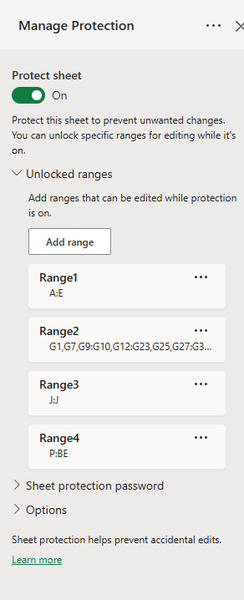
Can you show all of range2. My guess is that there might be a typo like G1:GG56 and hence it would unlock a large area. If you click on each of those ranges it should highlight that range on sheet. Can you verify that each of those highlighted ranges are what you expect (i.e. when you click on Range2 it only highlights cells in column G)
 JoM1987Aug 26, 2026Copper Contributor
It wont actually let me view that parameter. When I go to Format cells, there is no "Locked" parameter.
But I did figure out the fix this morning, and I believe you are correct.
I deleted the columns, and created new ones. The interesting thing about it, is that when I copied the original data over as Value only, it worked, but when I include formatting, it doesn't work. So I believe your idea is correct, but I cannot verify it.
Thank you for the response though!