Forum Discussion

kamjam
Mar 28, 2018Tin Contributor
excel help needed
Hi. I don't really use excel at work...until now. I have been given task and I am stuck.it will take me ages to do it manually, I thought you guys could help me to create formula. so the 1st spreads...
- Mar 29, 2018It is obvious that your lookup value is number but stored as text and the data where you are looking for values are numbers stored as number.
so either you need to change the lookup values back to numbers or simply you can revise your formula like this =VLOOKUP(VALUE(B2),................................... rest of reference
simply wrapping B2 with VALUE(B2) will solve it. Also in your formula you are using entire column reference like A:B which slows down your workbook. It is important to use Excel Tables, or only select the ranges with data instead of whole column reference.

kamjam
Mar 29, 2018Tin Contributor
Hi Ian
attached.
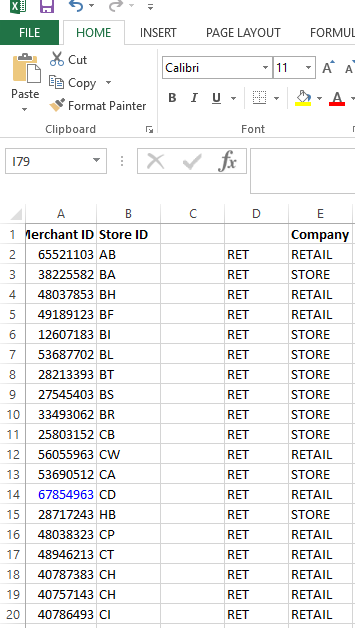

Jamil
Mar 29, 2018Bronze Contributor
It is obvious that your lookup value is number but stored as text and the data where you are looking for values are numbers stored as number.
so either you need to change the lookup values back to numbers or simply you can revise your formula like this =VLOOKUP(VALUE(B2),................................... rest of reference
simply wrapping B2 with VALUE(B2) will solve it. Also in your formula you are using entire column reference like A:B which slows down your workbook. It is important to use Excel Tables, or only select the ranges with data instead of whole column reference.
so either you need to change the lookup values back to numbers or simply you can revise your formula like this =VLOOKUP(VALUE(B2),................................... rest of reference
simply wrapping B2 with VALUE(B2) will solve it. Also in your formula you are using entire column reference like A:B which slows down your workbook. It is important to use Excel Tables, or only select the ranges with data instead of whole column reference.
- kamjamApr 03, 2018Tin Contributor
yep . and don't know how to change it !
- JamilApr 03, 2018Bronze Contributor
You are welcome.
- kamjamApr 03, 2018Tin ContributorThanks guys. done it :)
 Ian LeeMar 29, 2018Tin Contributor
Kamila
Jamil has got it spot on.
Your first spreadsheet contains text values (left aligned), whereas the second spreadsheet contains numerical values (right aligned). Change the formulae as he suggests and you should be on your way.
It is a pain in the neck when both sets of figures look identical but are actually different!