Forum Discussion

thesspie_ann
Jan 18, 2018Copper Contributor
Excel formula assistance needed!
Hi all,
I'm a bit of a novice when it comes to excel formulas, so any assistance I can get on the below would be amazing!
I need a formula that does the following:
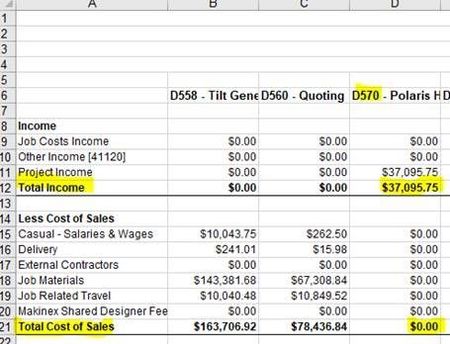
On 1 sheet I ...

thesspie_ann
Jan 18, 2018Copper Contributor
Hi Willy, thanks so much for the reply!
I tried putting the formulas into the spreadsheet, but it comes up with #REF! when I click control + shift + enter.
For total cost of sales, I edited the titles used so it looks like;
=INDEX(ProfitLoss!$B$6:$FE$21, 21, MATCH(TEXT(Sheet1!$A2,"000"), MID(ProfitLoss!$B$6:$FE$6, 2, 3), 0))
The name of sheet 1 is actually 'ProfitLoss' and sheet 2 'Sheet1'.
The last column is the spreadsheet is FE.
I wasn't sure whether to change where it has '000' to the digits of the job number (eg. '570'),
But when I did this it didn't give me the right number either.
Any suggestions to where I've gone wrong?
Thanks!

Willy Lau
Jan 18, 2018Steel Contributor
the 2nd parameter for index formula should be
7 for total income
16 for total cost of sales
I made mistakes before, sorry.
7 for total income
16 for total cost of sales
I made mistakes before, sorry.
- thesspie_annJan 18, 2018Copper Contributor
Great, thanks WIlly!