Forum Discussion

Excel formula assistance needed!
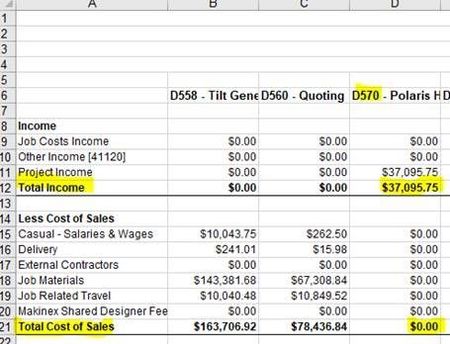

I am not good at Excel. For this question, I can think of array formula solution only.
For Total Cost of Sales
=INDEX('Sheet1'!$B$6:$D$21, 2116, MATCH(TEXT('Sheet2'!$A2,"000"), MID('Sheet1'!$B$6:$D$6, 2, 3), 0))
where $D should be changed to the last column in your sheet1.
After typing the above formula, keep in the editing cell mode, press CTRL + SHIFT + ENTER to make it as a array formula. Then it will look like
{=INDEX('Sheet1'!$B$6:$D$21, 2116, MATCH(TEXT('Sheet2'!$A2,"000"), MID('Sheet1'!$B$6:$D$6, 2, 3), 0))}
For Total income
=INDEX('Sheet1'!$B$6:$D$21, 127, MATCH(TEXT('Sheet2'!$A2,"000"), MID('Sheet1'!$B$6:$D$6, 2, 3), 0))
remember to turn it to array formula.
Array formula has low performance issue. If you data set is large, it performs slowly.
edition: correction is made in orange colour.
- thesspie_annJan 18, 2018Copper Contributor
Hi Willy, thanks so much for the reply!
I tried putting the formulas into the spreadsheet, but it comes up with #REF! when I click control + shift + enter.
For total cost of sales, I edited the titles used so it looks like;
=INDEX(ProfitLoss!$B$6:$FE$21, 21, MATCH(TEXT(Sheet1!$A2,"000"), MID(ProfitLoss!$B$6:$FE$6, 2, 3), 0))
The name of sheet 1 is actually 'ProfitLoss' and sheet 2 'Sheet1'.
The last column is the spreadsheet is FE.
I wasn't sure whether to change where it has '000' to the digits of the job number (eg. '570'),
But when I did this it didn't give me the right number either.
Any suggestions to where I've gone wrong?
Thanks!
- Willy LauJan 18, 2018Steel Contributorthe 2nd parameter for index formula should be
7 for total income
16 for total cost of sales
I made mistakes before, sorry.- thesspie_annJan 18, 2018Copper Contributor
Great, thanks WIlly!
