Forum Discussion

excel changing input values
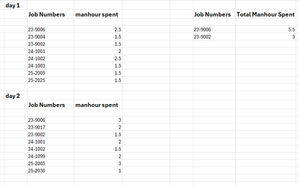

HELLO patrick good day to you. im here again today for some additional question to ask hope you'll have good mood to reply. your first suggested way of doing it is best already for the first requirement and my table will now be like this
i got now all the job numbers segregated with the total # of hours spent to it
my other report should be like the total hours spent on a specific job# must be in detail to which in my first table before the consolidation i have an input filled again called labor distribution code to which i need to test the job number first then after that the labor distribution code so that i can get the detailed manhours spent in an specific job number and the report should look like this
what can you suggest pls.

It looks like you want to "unpack" the data. Do you have a sample workbook you're able to share? This is do-able but I'd like to see where the task description and labor codes would come from to create this data.
- 0720Jun 12, 2025Copper Contributor
- Patrick2788Jun 13, 2025Silver Contributor
If you're able to share an anonymized sample workbook, it would help tremendously. Screen captures are good but nothing beats an .xlsx.
- 0720Jun 15, 2025Copper Contributor
i'll try if i can share the xlsx check if i can clean it. it has the logo of our company on all pages. i'll check and let you know and thanks a lot again
- 0720Jun 11, 2025Copper Contributor
labor code is from the data table with drop down menu.
each row input can have the same job number but different labor codes
depending on what they did on the specific job during the time like what is shown on image 2
first input the actual time to calculate the spent hrs then the job# then the labor code from the data table's drop down menu. from here this is where i will generate the report image i sent to you yesterday
- 0720Jun 13, 2025Copper Contributor
hope this is ok, i want on my report all job number segregated by labor distribution code and sum how is the easiest way for pls?