Forum Discussion

TheTallman
Jul 05, 2021Copper Contributor
Excel - Enhance excel workbook
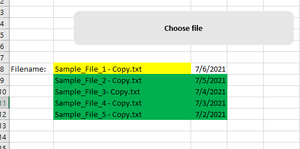
Hi All, I created a workbook with one command button that give a functionality to end user to browse a file and once file chosen its name get highlighted in workbook(yellow color). In my ongoing proj...
- Jul 05, 2021
1) Change the line
UserSelectedFile = Application.GetOpenFilenameto
UserSelectedFile = Application.GetOpenFilename(FileFilter:="Text Files (*.txt),*.txt")2) Use
        Range("B8:C8").Insert Shift:=xlShiftDown
        Range("B8:C8").Interior.Color = vbYellow
        Range("B8").Value = Mid(UserSelectedFile, InStrRev(UserSelectedFile, Application.PathSeparator) + 1)
        Range("C8").Value = Date ' or Now
        Range("B9:C9").Interior.Color = vbGreen
See the attached version.

HansVogelaar
Jul 05, 2021MVP
1) Change the line
UserSelectedFile = Application.GetOpenFilenameto
UserSelectedFile = Application.GetOpenFilename(FileFilter:="Text Files (*.txt),*.txt")2) Use
        Range("B8:C8").Insert Shift:=xlShiftDown
        Range("B8:C8").Interior.Color = vbYellow
        Range("B8").Value = Mid(UserSelectedFile, InStrRev(UserSelectedFile, Application.PathSeparator) + 1)
        Range("C8").Value = Date ' or Now
        Range("B9:C9").Interior.Color = vbGreen
See the attached version.
 TheTallmanJul 06, 2021Copper ContributorThank you so much HansVogelaar . It worked perfectly.