Forum Discussion

lexmayfie
Sep 23, 2023Copper Contributor
Error with conditional formatting formula
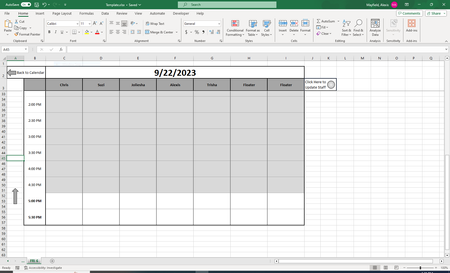
I have an issue with the formula I created below. I am trying to create a schedule for employees that will allow them to input their appointments and see what appointment is currently underway. I cre...

SergeiBaklan
Sep 23, 2023Diamond Contributor
To highlight current half-hour
it could be
=( ($C$2+$B4) <=NOW() )*( ($C$2+$B4+TIME(0,30,0) ) >NOW() )Be sure B4 is the first cell for the time.

lexmayfie
Sep 23, 2023Copper Contributor
This is perfect for the first row of the half hour but I have three rows per half hour, I can play around with it a little to get the other rows to interact as well but I think that's where I felt things became more complicated.
Edit: I just created an or condition for each separate row and it works perfect! Thank you so much 🙂
- SergeiBaklanSep 23, 2023Diamond Contributor
Sorry, missed that. It looks like B2:B4 are merged. When in B2 you have time, B3 and B4 are actually empty. Easiest way is to unmerge such cells and repeat time 3 time for each block. With another conditional formatting rule you may show the time only in the middle cell, for two others select font color same as background.