Forum Discussion

'Else part' of if() is executed even if the condition mentioned is true.
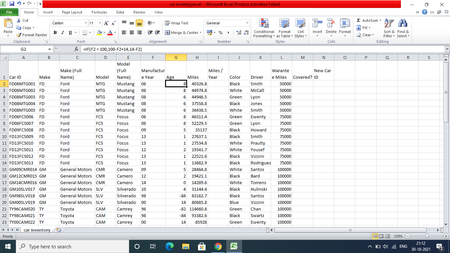


Column f is formatted as general not text SergeiBaklan
- Riny_van_EekelenOct 31, 2021Platinum Contributor
Saurav_Kaura Not sure I follow what you are trying to achieve, but is seems you calculate the age of cars counting from the year 2014. Correct?
If so, use the formula provided by SergeiBaklan in F2 and copy down and change the formula in G2 to
=IF(F2 > 14,100-F2+14,14-F2)and copy down, the ages will be as you would expect them to be.
- SergeiBaklanOct 30, 2021Diamond Contributor
It could be formatted as General, but MID() returns texts, thus values are considered as texts. You may check by ISTEXT() on cell from any empty one.
- Saurav_KauraOct 31, 2021Copper ContributorI have a doubt that how text format can be shown as general format in excel. Excel should show text format instead of general.
- SergeiBaklanOct 31, 2021Diamond Contributor
Format and type of the value are different things. If you apply General format to the cell which has Text value, you don't convert the value itself from one type to another, you need to reenter it.
Same if you return value by any formula. Returned value will be shown in the format already applied to the cell, formula result wont change any property of the cell, includes applied format.
If cell is under General format returned value will be shown as text or number depends on what formula returns. Simplest way to check - by default text is aligned to the left, and number to the right.
Here MID() from text always returns text and it is shown as text. If text represents number it may be converted to number within arithmetic operation, result will be number. Thus you may multiply such text on 1; or add zero; or apply two times negation (aka "double dash") to convert such text to number.
