Forum Discussion

Clair Huntley
Jul 05, 2018Copper Contributor
Date Formatting
I wonder if anyone could help me please? Its probably really simple but I can't for the life of me get Excel to do as I would like. On all our company graphs/pivots etc, date is displayed as ...
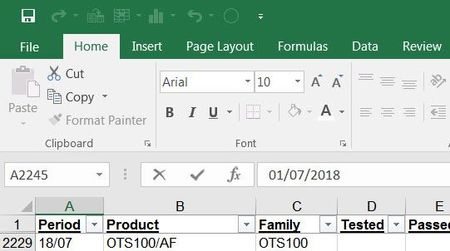
- Jul 05, 2018In your file, the value in A2 ia not a true date, but in fact text. But as soon as you edit that cell, Excel will try to assess what you entered, recognize the entry as a date and enter a true date into the cell. To avoid all of this, before making ANY edits to your data, Format the column in question as Text. Then do your edits.

Clair Huntley
Jul 05, 2018Copper Contributor
how do I flag my thread as resolved please?
Thank you
Clair

JKPieterse
Jul 05, 2018Silver Contributor
I don't think you can, at least I could not find a way to do so.