Forum Discussion

Data Validation drop-downs not by cell (Mac)


mathetes
Thanks for your reply earlier today. Appreciate your interest in helping.
The Excel file belongs to a client - so I am not able to share it with you.
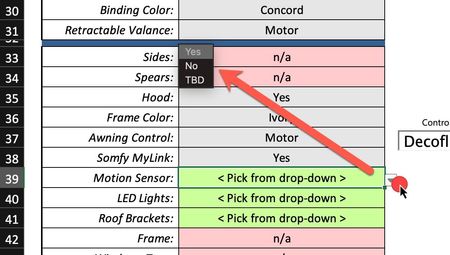
I did most of the development on a PC taking care to use only Mac-compatible features and the validation drop-downs work correctly on the PC. When I opened it on my MacBook Pro I saw the issue I described in my post.
The source for the validation drop-down is an Excel table - there are actually quite a lot of these tables that serve as lists for validation. Not sure if that might have something to do with it. I should do some testing to see if I can isolate the problem.
Interesting to meet you here - wonder if you might like to share some tips/tricks about Excel VBA development on MacOS. It can certainly be challenging not having user-forms and Active-X controls to work with. I also use ADODB recordsets a lot in my development on the PC - and that doesn't work on Mac.
My email address is mailto:del@customxltools.com if you'd like to connect outside of the Microsoft portal.
Best wishes,
Del
- mathetesOct 09, 2021Gold Contributor
You wrote: The source for the validation drop-down is an Excel table - there are actually quite a lot of these tables that serve as lists for validation. Not sure if that might have something to do with it. I should do some testing to see if I can isolate the problem.
Exactly what I would suggest next. Create another list temporarily, separate from the tables, and see if it works the same way in those very same cells.
wonder if you might like to share some tips/tricks about Excel VBA development on MacOS.
I'm actually not a user of VBA. I have recorded a few macros in the past (like two or three decades ago, literally), but don't make it a common practice at all. I prefer to figure out ways to use built-on functions. On the other hand, I'm long retired and have no need in my own applications for macros or VBA, and what I offer here on this Microsoft site is more along the lines of effective spreadsheet design, especially around basic databases (transactional/historical or simple records) and the myriad functions that enable Excel to make sense of the data.
That said, you might find the attached spreadsheet of interest in terms of data validation through a cascading set of lists. This is something I created in playing around with the new Dynamic Array functions (UNIQUE, in this case). There's a basic table that supplies a primary drop-down/validation list. Whatever the user selects from that primary list creates a secondary list that is unique to the primary selection. This is just a demo, but the potential is there for multiple levels..... The only official Excel table is in the upper left hand corner of the spreadsheet, and it can be expanded to add to the range of choices dynamically. Try it out.
 xocmisOct 11, 2021Copper Contributor
Thanks for sharing the cascading validation sample - lots of potential uses for this feature.
No joy finding a solution to my problem. Interesting that the misbehaving validation drop-downs coexist with others that are behaving correctly - all on the same worksheet.
Del