Forum Discussion

Data From Web - Connect Error - CR must be followed by LF
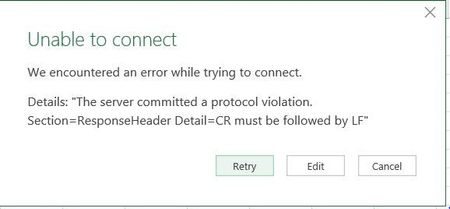

Thank you, Sergei
I just tried this both using authentication and anonymous. Didn't work, same error as before.
Also - where is there a description of the HTTP request header parameters (that are in the drop on the Advanced "From Web" form)?
Something that tells what the allowable options are?
The spurious LF in Cookies thing has been know for a long time. But here's the thing - the error does not occur in the Legacy "From Web" Add-in - only in the newest version of Get & Transform - which seems to have re-broken the function?

Joe,
Attached is the file with connection on first table, I used anonymous - it works. Generated query is
let
    Source = Web.Page(Web.Contents(
            "https://search.ancestry.com/cgi-bin/sse.dll?gl=allgs&gsln=Blackburn&catBucket=r&cp=4&_83004003-n_xcl=f&msbdy=1610&msbpn__ftp=norfolk%2c+england&msbpn=5276&msbdy_x=1&msbdp=10&msypn__ftp=norfolk%2c+england&msypn=5276&new=1&rank=1&redir=false&geo_a=r&geo_s=us&geo_t=us&geo_v=2.0.0&o_xid=62916&o_lid=62916&o_sch=Partners",
    [Headers=[Cookie="ignore"]])),
    Data0 = Source{0}[Data],
    #"Changed Type" = Table.TransformColumnTypes(Data0,{{"Column1", type text}, {"Column2", type text}, {"Column3", type any}, {"Column4", type text}})
in
    #"Changed Type"
Not sure where to find description of header parameters - I used this one on my guess.
Power Query and legacy From Web are fully different tools. Could consider that as broken functionality or as more strict requirements, but it works as it works. Can nothing to do with this, that's more question to Microsoft.
- Joe BlackburnJul 23, 2018Copper Contributor
Very weird that it works for you, not for me. I did it exactly as you did. Anonymous with Cookie ignore. I tried both the full URL and the tinyurl. Always the same error.
I have opened a support ticket...- SergeiBaklanJul 23, 2018Diamond Contributor
Joe, can't help here, have no idea what could be wrong. Perhaps support will help. Just in case that is my credentials for that source