Forum Discussion

Cube functions

Unfortunately don't remember any guidance, only samples in different places. And yes, if go deeper that's all about MDX. You may use practically all MDX functions and expressions within cube formulas.

Unfortunately the second function with the 2 sets isn't working for me. I'm getting a n/A error reading. I don't know what . I did actually try this before I made the post but in a way suggested in a mdx video on Youtube using {} to encase the joined members but that didn't work which brought here. But I'm sure we're both onto something, but I am blank. A
- SergeiBaklanDec 19, 2021Diamond Contributor
- ashmackey85Dec 20, 2021Copper Contributor
I saw the difference in what I missed. But even when I tried switching up the numbers in the file you sent the numbers didn't always show up correctly. But after researching some more videos, I noticed a trend. They all had a [measure] as a the "sort by". So I made a simple MIN( function of the ID numbers column and it now works once I choose ascending order as well. To anyone that may need to use this as reference, the numbers would have to in perfect order without skipping any numbers in between because if you don't the next number will screw everything up. For e.g. if you you were to have numbers from 1 to 10 and you miss out the 2 and the 4, number 3 will come in as the 2nd smallest number and number 5 will be the 3rd smallest number.
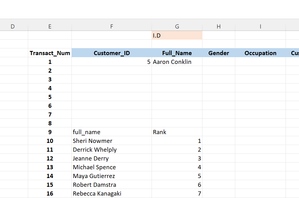
Also you will see the cubeset count one of the photos highlighted in blue w/ white text which is of course the correct amount. However, on another note, the number highlighted in brown tan w/ white text is where I get an N/a reading as if that's the limit of the set. Not sure if it's a bug in excel or if its from the fact the sample data model I used has several flaws unnoticed to me at this time
. Now I'm trying to see how I can get some kind of MATCH( function or something that can be nested the cube function. I'll try cubememberproperty since there's only 7 of them. If you or anyone reading this knows a function that's compatible please make mention. Will try any and post results. Thank you
- ashmackey85Feb 07, 2022Copper ContributorHappy new year to everyone! May you truly "excel" in everything you set out to do. To anyone on a bit of a quest trying to uncover and understand the cube functions as I am, I hope my findings be of a saves you a bit of a headache. I am very new to excel so I am in no way or form, an expert. But I am soo fascinated with the software. I'm all ears and eyes to anyone who may have pointers or anything of the sort. Sometimes they correct my problems or spark a thought that enables me to correct the issues myself. With that said, this is just an update to this thread/ discussion. In my last post, I uploaded some screenshots of a page out of a workbook connected to a data model I made from a sample used to teach data modeling, power queries and power pivot, and so on. To cut to the chase, I just realized why I was getting error readings when I tried to have names pulled from the cube, matching the I.D. numbers. So, I have 10282 UNIQUE id numbers. However, the sample recycled 100 names meaning that there are only 10182 UNIQUE in a bunch of 10282. Cubeset function apparently only counts the first instance of a name rather than consider, and will only give you a set of UNIQUE or distinct results. I can say that it's strange, or if it's a bug or anything and I'm not sure how else to correct the issue other than to change the text string so that it's not identical, perhaps ending the with a trailing space or two. hope this helps.