Forum Discussion

Create buttons to scroll through timeline
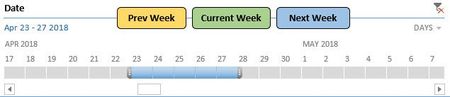

Anwesh-
Name the three shapes (buttons) like this:
Current Week = shpCurrent
Previous Week = shpPrevious
Next Week = shpNext
Then attach this macro to all of the shapes (buttons):
Sub Timeline_curr()

    Select Case Application.Caller
        Case "shpCurrent":
            CurrentWeekDateOffset = Date
            Csd = CurrentWeekDateOffset - Weekday(CurrentWeekDateOffset, 2) + 1
            Ced = CurrentWeekDateOffset - Weekday(CurrentWeekDateOffset) + 6
            ActiveWorkbook.SlicerCaches("NativeTimeline_Date").TimelineState.SetFilterDateRange Csd, Ced
        Case "shpPrevious":
            PreviousWeekDateOffset = Date - 7
            Psd = PreviousWeekDateOffset - Weekday(PreviousWeekDateOffset, 2) + 1
            Ped = PreviousWeekDateOffset - Weekday(PreviousWeekDateOffset) + 6
            ActiveWorkbook.SlicerCaches("NativeTimeline_Date").TimelineState.SetFilterDateRange Psd, Ped
        Case "shpNext":
            NextWeekDateOffset = Date + 7
            Nsd = NextWeekDateOffset - Weekday(NextWeekDateOffset, 2) + 1
            Ned = NextWeekDateOffset - Weekday(NextWeekDateOffset) + 6
            ActiveWorkbook.SlicerCaches("NativeTimeline_Date").TimelineState.SetFilterDateRange Nsd, Ned
    End Select

End Sub
The buttons should now perform as you expect.

This will just scroll between 3 consecutive weeks, I want the buttons to select the next/previous weeks of the currently selected week.
So if I click next week once it'll select next week, if I click it again, it'll select the week after that and so on.
But if I click the current week, it should select the current week and then start over.
- Matt MickleApr 26, 2018Bronze Contributor
Sure, just add a Global Variable and modify the procedure as follows. That should do the trick.
Option Explicit Public glblDate As Date Sub Timeline_curr() Dim CurrentWeekDateOffset As Date: Dim Csd As Date: Dim Ced As Date Dim PreviousWeekDateOffset As Date: Dim Psd As Date: Dim Ped As Date Dim NextWeekDateOffset As Date: Dim Nsd As Date: Dim Ned As Date Select Case Application.Caller Case "shpCurrent": glblDate = Date CurrentWeekDateOffset = Date Csd = CurrentWeekDateOffset - Weekday(CurrentWeekDateOffset, 2) + 1 Ced = CurrentWeekDateOffset - Weekday(CurrentWeekDateOffset) + 6 ActiveWorkbook.SlicerCaches("NativeTimeline_Date").TimelineState.SetFilterDateRange Csd, Ced Case "shpPrevious": If IsNull(glblDate) Then PreviousWeekDateOffset = Date - 7 Else PreviousWeekDateOffset = glblDate - 7 glblDate = PreviousWeekDateOffset End If Psd = PreviousWeekDateOffset - Weekday(PreviousWeekDateOffset, 2) + 1 Ped = PreviousWeekDateOffset - Weekday(PreviousWeekDateOffset) + 6 ActiveWorkbook.SlicerCaches("NativeTimeline_Date").TimelineState.SetFilterDateRange Psd, Ped Case "shpNext": If IsNull(glblDate) Then NextWeekDateOffset = Date - 7 Else NextWeekDateOffset = glblDate + 7 glblDate = NextWeekDateOffset End If Nsd = NextWeekDateOffset - Weekday(NextWeekDateOffset, 2) + 1 Ned = NextWeekDateOffset - Weekday(NextWeekDateOffset) + 6 ActiveWorkbook.SlicerCaches("NativeTimeline_Date").TimelineState.SetFilterDateRange Nsd, Ned End Select End Sub- Anwesh GangulaApr 30, 2018Iron ContributorThis works the same way, it just scrolls through the latest 3 weeks. For example, it goes to prev week(2018.04.23) when I press "Prev Week" once. But it doesn't do anything when I click "Prev Week" again.
- Matt MickleMay 02, 2018Bronze Contributor
Anwesh-
Just wanted to follow up and see if you were able to get your issue sorted out? If you're still having trouble feel free to reach back out. Always happy to help! That's what the Excel Community is here for!