Forum Discussion

Anwesh Gangula
Apr 23, 2018Iron Contributor
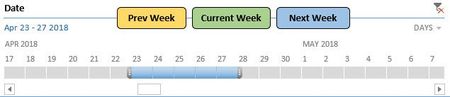
Create buttons to scroll through timeline
I would like to create 3 buttons that'll help us navigate through the timeline for a pivot table(Screenshot below) I was able to figure out the code for "current week" as following Sub ...

Matt Mickle
Apr 25, 2018Bronze Contributor
Anwesh-
Name the three shapes (buttons) like this:
Current Week = shpCurrent
Previous Week = shpPrevious
Next Week = shpNext
Then attach this macro to all of the shapes (buttons):
Sub Timeline_curr()

    Select Case Application.Caller
        Case "shpCurrent":
            CurrentWeekDateOffset = Date
            Csd = CurrentWeekDateOffset - Weekday(CurrentWeekDateOffset, 2) + 1
            Ced = CurrentWeekDateOffset - Weekday(CurrentWeekDateOffset) + 6
            ActiveWorkbook.SlicerCaches("NativeTimeline_Date").TimelineState.SetFilterDateRange Csd, Ced
        Case "shpPrevious":
            PreviousWeekDateOffset = Date - 7
            Psd = PreviousWeekDateOffset - Weekday(PreviousWeekDateOffset, 2) + 1
            Ped = PreviousWeekDateOffset - Weekday(PreviousWeekDateOffset) + 6
            ActiveWorkbook.SlicerCaches("NativeTimeline_Date").TimelineState.SetFilterDateRange Psd, Ped
        Case "shpNext":
            NextWeekDateOffset = Date + 7
            Nsd = NextWeekDateOffset - Weekday(NextWeekDateOffset, 2) + 1
            Ned = NextWeekDateOffset - Weekday(NextWeekDateOffset) + 6
            ActiveWorkbook.SlicerCaches("NativeTimeline_Date").TimelineState.SetFilterDateRange Nsd, Ned
    End Select

End Sub
The buttons should now perform as you expect.
- Anwesh GangulaApr 25, 2018Iron Contributor
This will just scroll between 3 consecutive weeks, I want the buttons to select the next/previous weeks of the currently selected week.
So if I click next week once it'll select next week, if I click it again, it'll select the week after that and so on.But if I click the current week, it should select the current week and then start over.
- Matt MickleApr 26, 2018Bronze Contributor
Sure, just add a Global Variable and modify the procedure as follows. That should do the trick.
Option Explicit Public glblDate As Date Sub Timeline_curr() Dim CurrentWeekDateOffset As Date: Dim Csd As Date: Dim Ced As Date Dim PreviousWeekDateOffset As Date: Dim Psd As Date: Dim Ped As Date Dim NextWeekDateOffset As Date: Dim Nsd As Date: Dim Ned As Date Select Case Application.Caller Case "shpCurrent": glblDate = Date CurrentWeekDateOffset = Date Csd = CurrentWeekDateOffset - Weekday(CurrentWeekDateOffset, 2) + 1 Ced = CurrentWeekDateOffset - Weekday(CurrentWeekDateOffset) + 6 ActiveWorkbook.SlicerCaches("NativeTimeline_Date").TimelineState.SetFilterDateRange Csd, Ced Case "shpPrevious": If IsNull(glblDate) Then PreviousWeekDateOffset = Date - 7 Else PreviousWeekDateOffset = glblDate - 7 glblDate = PreviousWeekDateOffset End If Psd = PreviousWeekDateOffset - Weekday(PreviousWeekDateOffset, 2) + 1 Ped = PreviousWeekDateOffset - Weekday(PreviousWeekDateOffset) + 6 ActiveWorkbook.SlicerCaches("NativeTimeline_Date").TimelineState.SetFilterDateRange Psd, Ped Case "shpNext": If IsNull(glblDate) Then NextWeekDateOffset = Date - 7 Else NextWeekDateOffset = glblDate + 7 glblDate = NextWeekDateOffset End If Nsd = NextWeekDateOffset - Weekday(NextWeekDateOffset, 2) + 1 Ned = NextWeekDateOffset - Weekday(NextWeekDateOffset) + 6 ActiveWorkbook.SlicerCaches("NativeTimeline_Date").TimelineState.SetFilterDateRange Nsd, Ned End Select End Sub- Anwesh GangulaApr 30, 2018Iron ContributorThis works the same way, it just scrolls through the latest 3 weeks. For example, it goes to prev week(2018.04.23) when I press "Prev Week" once. But it doesn't do anything when I click "Prev Week" again.
