Forum Discussion

romancristiani
Mar 05, 2023Copper Contributor
Counting Cells by Color with conditional formatting
Each row represents a location. Each column is a metric that we track for each location. The metrics and goals are the same for each location. Each cell changes color based on conditional formatting....
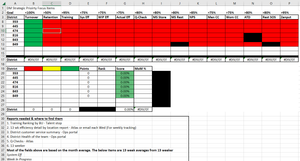
- Mar 05, 2023
Here is the VBA code I came up with:
Function CountColor(rng As Range, colorcell As Range) As Long
    Dim cell As Range
    Dim clr As Long
    clr = colorcell.Interior.Color
    For Each cell In rng
        If Evaluate("GetColor(" & cell.Address(External:=True) & ")") = clr Then
            CountColor = CountColor + 1
        End If
    Next cell
End Function

Function GetColor(cell As Range) As Long
    GetColor = cell.DisplayFormat.Interior.Color
End Function
The formula in B20 is
=IF($A20="", "", CountColor($B8:$P8, B$19))
This can be filled to the right to D20, ten down to row 25.
I have attached the workbook to a PM to you. You'll have to allow macros when you open it.

Damar9
Aug 21, 2024Copper Contributor
Here you go:
https://drive.google.com/file/d/1_5lHi6OyfvVpznGUI1gl-RuTEYf-2PPh/view?usp=sharing
I'm trying to get Control!G6 to tell me the number of students in set "A 1" whose performance is rated with the green. I have the overall totals at the bottom using your solution, but can't make it take note of the set as well for the class totals.
Thanks again,

HansVogelaar
Aug 21, 2024MVP
Thanks. I added a new function - see the attached workbook.
- Damar9Aug 21, 2024Copper ContributorWow, thank you so much!