Forum Discussion

COUNTIF #VALUE! error
 Jun 02, 2022
1411535 wrote:
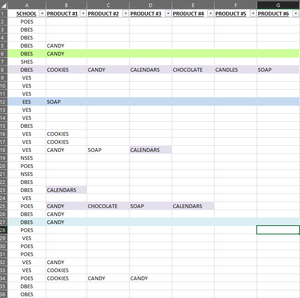
``=COUNTIFS('2022 PRODUCTS'!B2:G144,"COOKIES",
'2022 PRODUCTS'!A2:A144,"VSE")``
The problem is: you have 6 columns in the first range and only 1 column in the second range.
From the COUNTIFS help page: ``Each additional range must have the same number of rows and columns as the criteria_range1 argument.``
Alternatively, use SUMPRODUCT as follows:
=SUMPRODUCT(('2022 PRODUCTS'!B2:G144="COOKIES")
*('2022 PRODUCTS'!A2:A144="VSE"))
1411535 wrote:
``=COUNTIFS('2022 PRODUCTS'!B2:G144,"COOKIES",
'2022 PRODUCTS'!A2:A144,"VSE")``
The problem is: you have 6 columns in the first range and only 1 column in the second range.
From the COUNTIFS help page: ``Each additional range must have the same number of rows and columns as the criteria_range1 argument.``
Alternatively, use SUMPRODUCT as follows:
=SUMPRODUCT(('2022 PRODUCTS'!B2:G144="COOKIES")
*('2022 PRODUCTS'!A2:A144="VSE"))