Forum Discussion

Tom Williams
Aug 24, 2017Copper Contributor
Conditional Formatting using both current and adjacent cells
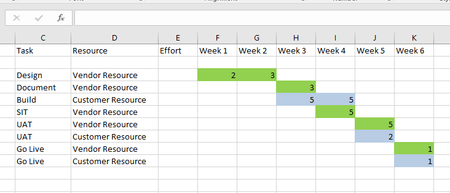
Hi I am trying to highlight cells in an Excel planning spreadsheet showing tasks and days effort for Vendor and Customer resouces. I can highlight the "days effort" cells based on whether they ...
- Aug 25, 2017
Hi Tom,
Two rules in Conditional formatting applied to your entire range starting from E3(?)
=ISNUMBER(SEARCH("customer",$D3))*(E3>0)and similar one for vendors


Tom Williams
Aug 24, 2017Copper Contributor
Forgot to say that the formula I have been trying to use was based along the lines of: "If column D contains "vendor" and Cell value > 0 then colour it green; if column D contains "Customer" and cell value > 0 then color it blue.
Thanks again!
Thanks again!
- SergeiBaklanAug 25, 2017Diamond Contributor
Hi Tom,
Two rules in Conditional formatting applied to your entire range starting from E3(?)
=ISNUMBER(SEARCH("customer",$D3))*(E3>0)and similar one for vendors
- Tom WilliamsAug 25, 2017Copper Contributor
Perfect - that's worked!! Thank you so much, Sergei!
Tom