Forum Discussion

Björn Landelius
Jun 21, 2018Copper Contributor
Conditional Formatting Forumla
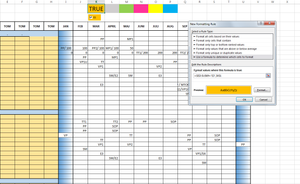
Hey! I'd need some help. My goal is that whenever I write E3 in the marked area (I3:U69) I want the cell to become orange when K1 is true. Is there something I'm missing? Thanks

SergeiBaklan
Jun 21, 2018Diamond Contributor
Hi Bjorn,
Rule formula could be
=($K$2="E3")*$K$1
and the rule is applied to you $I$3:$U$69 range
 Björn LandeliusJun 21, 2018Copper Contributor
Hey and thanks for a quick response.
I still don't get it to work, are you sure with your solution?
- SergeiBaklanJun 21, 2018Diamond Contributor
Yes, I misunderstood your picture, Matt gave correct formula
=(I3="E3")*$K$1
- Matt MickleJun 21, 2018Bronze Contributor
You can also use this formula:
=AND($K$1=TRUE,I3="E3")
- Björn LandeliusJun 21, 2018Copper Contributor
Thanks for the reply!
Now it's getting real weird. After some googling I also came up with the same conclusion and formula, but still I get the same error. It's Excel 2013 I'm using, could that have an effect?
