Forum Discussion

AndyT410
Apr 19, 2023Brass Contributor
Combine multiple results in to 1 row
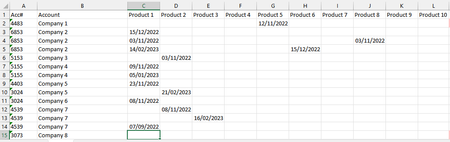
Hi, I have a table with rep contacts on different product topics on different days to the same customer as below which are on different rows dependent on the date. Is there a formula that I could us...

AndyT410
Apr 19, 2023Brass Contributor
Thanks Nikolino,
That's right. I've used a pivot table but it's very limited in the way It sorts or doesn't allow me to sort by different columns.
That's right. I've used a pivot table but it's very limited in the way It sorts or doesn't allow me to sort by different columns.

Lorenzo
Apr 19, 2023Silver Contributor
If you run Excel >/= 2016 / Windows there's probably something to do with Get & Transform aka Power Query
Glad to have a look at this if you can share a representative workbook + an example of the expected result as I must admit it's not clear to me
- AndyT410Apr 20, 2023Brass ContributorHI,
I've done it. I used a pivot table to get everything together. Then on a different worksheet I used Sort & Filter referencing another cell to change the sort order. Thanks for the suggestions.- LorenzoApr 20, 2023Silver ContributorHi
Glad you now have something that meets you need & Thanks for documenting your solution
Nice day...