Forum Discussion

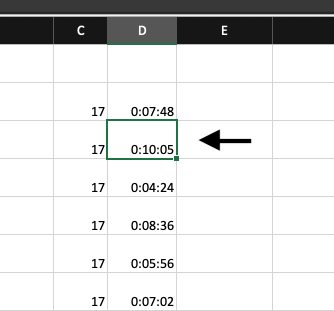
Column formatted as h]:mm:ss defaults to AMPM time upon editing cell
- May 24, 2026
This behavior is expected in Excel on Mac. Even though the column is formatted as [h]:mm:ss, Excel still treats the value internally as a standard time value, so when you edit the cell it may display in AM/PM format.
As a workaround, we recommend entering durations with the hour included (for example 0:10:05 instead of 10:05) and keeping the column formatted as [h]:mm:ss. The displayed values and calculations will still work correctly as elapsed time.
Tipps…
Avoid h:mm:ss Format: This format resets to 0 after 24 hours (e.g., 25:30:00 becomes 1:30:00). Use [h]:mm:ss for durations over 24 hours.
Check for Hidden Formatting: If the issue persists, ensure no conditional formatting or data validation is overriding the [h]:mm:ss format.
My answers are voluntary and without guarantee!
Hope this will help you.
Was the answer useful? Mark as best response and like it!
This will help all forum participants.


Thank you for this answer. I suspected it may be an internal Mac thing, as I did not have this issue when displaying the sheet on my Windows laptop. I appreciate your help!