Forum Discussion

Choose one approximate value between two dates
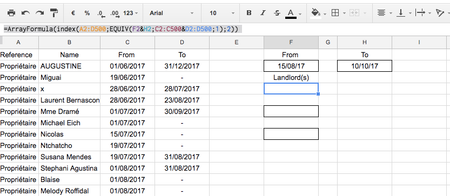
- Jun 21, 2017
Katia, forgot to check what's the logic with To field in column D. If empty cell means the landord available from "From" date till any date in future, when we have to add in criteria if in D is empty cell. Number of available landlords (H2) will be
=SUMPRODUCT((C:C>0)*(C:C<=$F$2)*((D:D>=$G$2)+(D:D=0)))
and the formula in F4 (and down after that) is
=IF(
 ROWS(F$4:F4)<=$H$2,
 INDEX(B:B,
  SMALL(
   IF(C:C<=$F$2,
    IF((D:D>=$G$2)+(D:D=0),
     ROW(D:D)
    )
   ),
   ROWS(F$4:F4)
  )
 ),
 ""
)
File is attached.

Hi Katia,
To enter array formula you have to enter it with combination of Ctrl+Shift+Enter, not just Enter
Your formula will look like (English UK notation)
=INDEX(A2:D500,MATCH(1,(F2>=C2:C500)*(H2<=D2:D500),0),2)
Under the Match you find if both dates are in the range, if TRUE condition returns 1 for proper record and that's what you need for the INDEX.
When back to French change comma "," on semicolon ";" as separator

Thanks so much for your quick response!
Your answer has been very useful but now i have another problem, it just appears one name instead of at least couple of them, even when i choose the area, and do the ctrl+shift+enter at the end of the formule.
What am i doing wrong this time??
Cheers
K
- SergeiBaklanJun 21, 2017Diamond Contributor
Hi Katia,
For multiply records we may use the patter which is described in many places, for example here http://www.exceltactics.com/make-filtered-list-sub-arrays-excel-using-small/
Result looks like
If step by step
1) Let add to $H$2 total number of lanlords who meet dates criteria using
=SUMPRODUCT((C:C<=$F$2)*(D:D>=$G$2))
Above is equivalent of AND() on two columns (that's not an array formula)
2) If list of landords we are looking for starts from F4 let put into tyhis cell an array (Ctrl+Shift+Enter) formula
=IF(
   ROWS(F$4:F4)<=$H$2,
   INDEX(B:B,
      SMALL(
         IF(C:C<=$F$2,
            IF(D:D>=$G$2,
               ROW(D:D)
            )
         ),
         ROWS(F$4:F4)
      )
   ),
   ""
)
In
ROWS(F$4:F4)
pay attention to absolute and relative references and what in F4 your list starts.
After that just copy cell F4 down.
3) In addition (or alternatively) you may use Conditional formatting to highlight available landlords in main list.
- Stay on cell B2 where entire list of names starts
- in Ribbon select Home->Conditional formatting->Manage rules
- New Rule and at the bottom of rule types select rules with formula
- in the formula bar enter formula which returns TRUE if criteria for the record in row is met
=($C2<=$F$2)*($D2>=$G$2)
(again, take care about absolute and relative references)
- apply desired format
- in Apply to enter
=$B:$B
- when Ok
That's all. See attached file for more details. And be careful applying above to the file with your regional setting.
- SergeiBaklanJun 21, 2017Diamond Contributor
Katia, forgot to check what's the logic with To field in column D. If empty cell means the landord available from "From" date till any date in future, when we have to add in criteria if in D is empty cell. Number of available landlords (H2) will be
=SUMPRODUCT((C:C>0)*(C:C<=$F$2)*((D:D>=$G$2)+(D:D=0)))
and the formula in F4 (and down after that) is
=IF(
 ROWS(F$4:F4)<=$H$2,
 INDEX(B:B,
  SMALL(
   IF(C:C<=$F$2,
    IF((D:D>=$G$2)+(D:D=0),
     ROW(D:D)
    )
   ),
   ROWS(F$4:F4)
  )
 ),
 ""
)
File is attached.
- Katia LavilleJun 22, 2017Copper Contributor
YES!
Thank you so much Sergei! I did it with your help! I'm astonished by your kindness helping people you don't even know! Sharing your knowledge, it's amazing! It's a real community! I am reading your formulas and getting into the logic. I will amuse myself for a couple of days i think. I've never used the C:C thing.
Thanks so much again!
Hope to see you around!
Bye
Katia