Forum Discussion

Kelly Stanford
Mar 31, 2017Copper Contributor
Chart
Can you simply rotate a chart(X/Y) where the primary and secondary data would be on top and the primary axis is on the left?

Haytham Amairah
Mar 31, 2017Silver Contributor
You can simply do that.
Change the way that data is plotted
Click anywhere in the chart that contains the data series that you want to plot on different axes.
This displays the Chart Tools, adding the Design, Layout, and Format tabs.
On the Design tab, in the Data group, click Switch Row/Column.
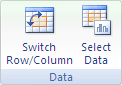
Source: https://goo.gl/QbbrFq

Kelly Stanford
Mar 31, 2017Copper Contributor
Thanks for the reply Hatham. When I did that it told me I only had max of 255 data series per chart.