Forum Discussion

Cell Format within ABCD
- Jun 06, 2018
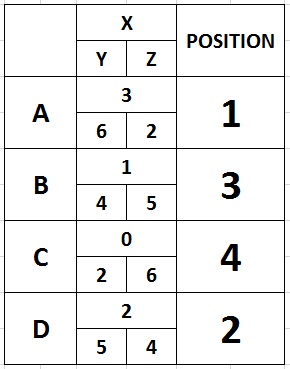
If I understood right, you want to rank A B C D looking at X value; if there's a tie between any X, you check Y, then Z.
How many groups (A B C...) are you going to have in general? 4? Or they can be 10, 200, 5000?
I created something you should check.
Try change values in green cells, and check the red ones (do not overwrite red cells!). Is that the right way to check the rankings?
At the end, you should hide columns F to J (so you won't see the calcs).
What I did:
First, I ranked X, Y and Z in 3 different columns (F G H).
Second, I "merged" the 3 rankings adding rank(X) + rank(Y)/10 + rank(Z)/100; in this way I have a number like 1,14 for the Team A. 1,14 means that X value is ranked 1°, Y is 1° and Z is 4°.
If you'll have 10 to 99 groups (letters, in your example), you have to switch that formula to: rank(X) + rank(Y)/100 + rank(Z)/10000 obtaining 1,0104.
Changing that dividers allows the bottom ranking of 99,9999 (X 99°, Y 99°, Z 99°).
In general, you should count the last position available and adjust the number of 0 in that formula.
I called the I column "tot. rank" meaning the sum of these rankings (now you have to forget the points, we're talking about rankings and orders).
Now, because 1 is the best ranking, you have to sort these "tot. rank" in a new column "Rank of Totals", but you have to sort them starting from the smallest so the new formula is rank(value;all cells;1): the last "1" means that you want to have first the smallest value (1° is 1 and it's better and smaller than 5° that is 5).

If I understood right, you want to rank A B C D looking at X value; if there's a tie between any X, you check Y, then Z.
How many groups (A B C...) are you going to have in general? 4? Or they can be 10, 200, 5000?
I created something you should check.
Try change values in green cells, and check the red ones (do not overwrite red cells!). Is that the right way to check the rankings?
At the end, you should hide columns F to J (so you won't see the calcs).
What I did:
First, I ranked X, Y and Z in 3 different columns (F G H).
Second, I "merged" the 3 rankings adding rank(X) + rank(Y)/10 + rank(Z)/100; in this way I have a number like 1,14 for the Team A. 1,14 means that X value is ranked 1°, Y is 1° and Z is 4°.
If you'll have 10 to 99 groups (letters, in your example), you have to switch that formula to: rank(X) + rank(Y)/100 + rank(Z)/10000 obtaining 1,0104.
Changing that dividers allows the bottom ranking of 99,9999 (X 99°, Y 99°, Z 99°).
In general, you should count the last position available and adjust the number of 0 in that formula.
I called the I column "tot. rank" meaning the sum of these rankings (now you have to forget the points, we're talking about rankings and orders).
Now, because 1 is the best ranking, you have to sort these "tot. rank" in a new column "Rank of Totals", but you have to sort them starting from the smallest so the new formula is rank(value;all cells;1): the last "1" means that you want to have first the smallest value (1° is 1 and it's better and smaller than 5° that is 5).

If I understand correctly, you want to rate A B C D see the value of X; if there is a string between X, you check Y, then Z.
That is correct. but I forgot to explain something, I have explained below.
How many groups (A B C ...) do you have in general? 4? Or they can be 10, 200, 5000?
Only 4 at least and 8 at most in 1 group. 3 at least but rare.
I created something you need to check.
Thank you and appreciated it.
Try changing the value in the green cell, and check the red (do not change the red cell!). Is that the right way to check the position?
Ok. Yes, that's the way to check the position but there's a little more explanations that I have not described in the exact way that is, To get the real position between A, B, C, D, first need to refer to the most X, secondly refer Y most and third refer Z at least . This is because X is the amount of points collected for the entire game of example between A and B who won the game will earn 1 point, followed by Y is the highest total winning points for each game set (example) 1 to 5 set who is first, while Z is the total of lost point. This means the total number of points Y (needs a lot) and total points Z (need to be less) to determine who is eligible for a position between 1 to 4 (if 1 group has 4).
In the end, you should hide the columns F to J (so you will not see calc).
Ok.
I have attach the another schedule with a difference amounts and example if amount in the red pentagon is less than another should be winner. But If amount in green pentagon are same also the last refer is what i call (head to head) that is very rare due to need check current match between B and D who's win the game should be winner (example) in green pentagon between B and D, D are win the current match and the position is No 1.
I hope you can help me about this. I very appreciated what you have did for me.
Thanks,
Regards,
Uncle Rich...

- Arul TresoldiJun 07, 2018Iron Contributor
I understood.
By switching the ranking order of Z values (adding ";1") you give to values the opposite valor (less means better).
Then, in case of a tie, you have to check who is the direct-winner, right?
I'm not getting how some matches are not symmetric (A vs C is 1x 2y 0z and C vs A is 0x 1y 2z; I thought it should be 0x 0y 2x aka simply switching y and z -I ignore x that is the final result win/lose-).
I'm attaching a newer version with tons of calcs that I'm not able to explain in details.
Column AA to AD check if there are some ties.
Column AE to AM are a table with multiple entries that states who won against who and meanwhile count all ties between first place, second, third etcetera.
Column AN to AS assign to each Team (A B C D E F G H) its appropriate opposite in the tie breaker. ATTENTION: you must name the teams with A to H, and this is not working if there are more than 2 teams in a tie (let's say A, B and F are all 1x 2y 0z). This 3+ ties results in #N/D! Error in the table (col U, "POS").
Column AU to BD assigns points to a team IF it won against its opposer Team in the tie.
Column BE sums these points and BF create the specular (needed to rank). Column BG add these values to the rankings summed before (before applying tie-breaks).
BH is now "Rank of Totals" with all Tie Breaks applied.
Hide from W to BH for a better output ;)
- Rich UncleJun 08, 2018Copper Contributor
Hi Arul,
Thanks for the fast reply.
Then, in case of a tie, you have to check who is the direct-winner, right?Yes correct.
I'm not getting how some matches are not symmetric (A vs C is 1x 2y 0z and C vs A is 0x 1y 2z; I thought it should be 0x 0y 2x aka simply switching y and z -I ignore x that is the final result win/lose-).It depends on the match method, example best of 3, usually the win will be just like 2-0,2-1 or 1-2 only, according to the game set and none other if match format is different.
I am attaching a newer version with lots of calcs that I can not explain in detail.It's okay to come, but you're a lot to help me in this case and I'm really worth it because it's out of my mind box and I can not afford to this level unless I'm studying, I have no knowledge in excel just a little bit.
An AN column to the US assigns to each of the Teams (A B C D E F G H) the corresponding resistance in the casting rope. NOTE: You must name a team with A to H, and this does not work if there are more than 2 teams in the tie (say A, B and F are all 1x 2y 0z). This 3+ result produces # N / D! Error in table (col U, "POS").Yes I have seen and understand what you mean.
The AU and BD columns surrender points to the IF team he won a match against his opposing side.Yes this table is certainly the last way to get a decision if all the scores are the same. the clearer (head to head)
I have attached 1 sample table that I have changed slightly from 8 to 4 only without disturbing all the formats you have made, trying to see.
When it's almost ready all I'm dealing with is the problem of getting a position on the match table (in blue) I've come up with a format like you did but the answer I get is zero. Do I have mistake? can you help me to check?
I have to do this for a lot of tables and I refer to the example you've shared. I have a schedule for 3,4,5,6,7, and 8. I have to do one for full information for every match schedule I have recommended. It aims to simplify my work and save time every game.Thanks in Advance,
Regards,
Uncle Rich...
- Arul TresoldiJun 08, 2018Iron Contributor
Formulas in column W to BH are fixed to the table with $.
It now refers to cells (example) AE4 but you copied that table in row 104, so the valor it's receiving is 0 and this messes up everything.
Take my file (the one I sent you) and copy 1 table at a time. Once you copied the first table (and you have the second), you have to change the refers in that columns (W-BH); click on the formula and move the colored squares on the correspondant cell in the new table (which will have all datas but no refers on that cells).
It's a bit hard or tricky to do it, but it's ok.
In alternative, you should duplicate the sheet and have Group 1, Group 2... sheets with all the formula I made before (download the file again to avoid other errors).
So, all the 1vs1 tables are to be separated between the sheets.
EDIT: instead of deleting columns and rows if you need 4 team groups instead of 8, just hide them. You'll be able to use again the same file (after changing datas) in a later tournament even if there are more players.