Forum Discussion

Can anyone help with this problem and point me in the right direction please.
 Feb 18, 2018
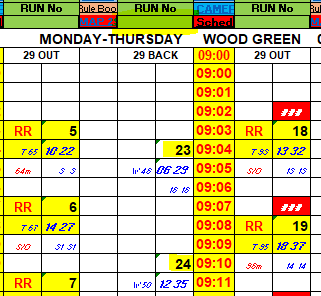
I would like to have a try, but, your sample doesn't show as what you want.
For example, point 1, after selecting 23, the 4 cells (2x2) below it are not highlighted. I guess it would look like "18" in your screenshot, but only 2x2cells (including the number row) are highlighted, not 2x3.
Also, would you please clarify
- If those "RUN NO" are selected, do you mean all the cells contains the "RUN NO"s will be highlighted; or just the cells below that RUN NO will be highlighted?
What I am asking is, for example, if I select "18" on the "RUN NO" above "29 BACK", should we highlight the "18" which is below "29 OUT"? - This is about your point 3 "it is very important that the selected cells remain like this when other cells are being selected." If we selected "23" this time, and then, change the selection to "24", should the formatting in the cells around 23 be removed?
- If those "RUN NO" are selected, do you mean all the cells contains the "RUN NO"s will be highlighted; or just the cells below that RUN NO will be highlighted?
I would like to have a try, but, your sample doesn't show as what you want.
For example, point 1, after selecting 23, the 4 cells (2x2) below it are not highlighted. I guess it would look like "18" in your screenshot, but only 2x2cells (including the number row) are highlighted, not 2x3.
Also, would you please clarify
- If those "RUN NO" are selected, do you mean all the cells contains the "RUN NO"s will be highlighted; or just the cells below that RUN NO will be highlighted?
What I am asking is, for example, if I select "18" on the "RUN NO" above "29 BACK", should we highlight the "18" which is below "29 OUT"? - This is about your point 3 "it is very important that the selected cells remain like this when other cells are being selected." If we selected "23" this time, and then, change the selection to "24", should the formatting in the cells around 23 be removed?
 lee ashtonFeb 19, 2018Copper Contributor
Hi Willy Lau,
Thank you for your response.
The cells highlighted in yellow have not been selected, but are highlighted for another reason.
If Run No 18 was selected it would have to be shaded in red with 75% grey. It would also be the same as I mentioned, a block of 6 cells 2 wide by 3 high.
Point 1 that you mentioned, only the Run No's selected would be highlighted and have to remain highlighted when other Run No's are selected. This is because other Run No's may be selected at a later stage by the user.
Point 2 that you mentioned, the Data Validation list has the ability to have multiple selections made at once. Therefore I could choose Run No 23 on its own or 23 and 24 together.
The Data Validation selection refers to the numbers in the column directly below.
I hope this clarifies things a little better for you.
And once again many thanks for your response I have been trying to get help with this problem for months now.
Regards
Lee Ashton