Forum Discussion

GeoffT2022
Apr 17, 2022Copper Contributor
Can a Macro be created for this?
I'm running Windows 10, Excel 2013 In the attached example, I'd like to be able to run a macro that runs down Column F from the top to bottom (which is over 300 rows) and insert a row and a formu...
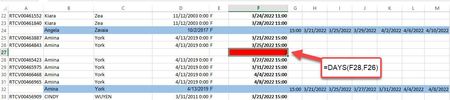

GeoffT2022
Apr 17, 2022Copper Contributor
Thank you!
I tested it out and it works on the sheet you attached. I am new to this but a fast learner. The only thing, it only looks at dates above and below blank rows. How can it enter blank rows automatically?
I tested it out and it works on the sheet you attached. I am new to this but a fast learner. The only thing, it only looks at dates above and below blank rows. How can it enter blank rows automatically?
GeoffT2022
Apr 17, 2022Copper Contributor
Or, I will need another macro to insert the lines...?
- GeoffT2022Apr 17, 2022Copper ContributorOk, I found an easy workaround for adding the blank rows. I will now experiment with my actual data and provide update.
 OliverScheurichApr 18, 2022Gold Contributor
Sub dates() Dim i As Integer Dim lngzeilemax As Integer Dim j As Integer Dim z As Integer Dim w As Integer lngzeilemax = Cells(Rows.Count, 6).End(xlUp).Row j = Application.WorksheetFunction.Count(Range(Cells(1, 6), Cells(lngzeilemax, 6))) z = Application.WorksheetFunction.CountBlank(Range(Cells(1, 6), Cells(lngzeilemax, 6))) w = j - z + z + j For i = 2 To w If Cells(i, 6) <> "" And Cells(i + 1, 6) <> "" Then Cells(i + 1, 6).EntireRow.Insert Else If Cells(i, 6) = "" Then If Application.WorksheetFunction.Days(Cells(i + 1, 6), Cells(i - 1, 6)) < 4 And Application.WorksheetFunction.Days(Cells(i + 1, 6), Cells(i - 1, 6)) >= 0 Then Cells(i, 6).FormulaR1C1 = "=DAYS(R[1]C[0],R[-1]C[0])" Cells(i, 6).NumberFormat = "0" Cells(i, 6).Interior.ColorIndex = 3 Else If Application.WorksheetFunction.Days(Cells(i - 1, 6), Cells(i + 1, 6)) < 4 And Application.WorksheetFunction.Days(Cells(i - 1, 6), Cells(i + 1, 6)) >= 0 Then Cells(i, 6).FormulaR1C1 = "=DAYS(R[-1]C[0],R[1]C[0])" Cells(i, 6).NumberFormat = "0" Cells(i, 6).Interior.ColorIndex = 3 Else End If End If Else End If End If Next i End SubYou can try this code. Click the button in cell I1 in the attached file to start the macro. The macro now inserts blank rows and displays the formula where applicable.
- GeoffT2022Apr 20, 2022Copper Contributor
This works great on the sample sheet. I now have the following 2 questions:
1) What change to the code is needed to target column M instead of F?
2) Can this run on larger datasets? I get a Run-time error: Overflow message when trying to run on a sheet with 72000 rows.