Forum Discussion

GeoffT2022
Apr 17, 2022Copper Contributor
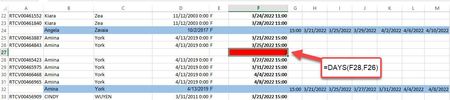
Can a Macro be created for this?
I'm running Windows 10, Excel 2013 In the attached example, I'd like to be able to run a macro that runs down Column F from the top to bottom (which is over 300 rows) and insert a row and a formu...

OliverScheurich
Apr 17, 2022Gold Contributor
Sub dates()

Dim i As Integer
Dim lngzeilemax As Integer

lngzeilemax = Cells(Rows.Count, 6).End(xlUp).Row
For i = 2 To lngzeilemax

If Cells(i, 6) = "" Then
If Application.WorksheetFunction.Days(Cells(i + 1, 6), Cells(i - 1, 6)) < 4 And Application.WorksheetFunction.Days(Cells(i + 1, 6), Cells(i - 1, 6)) >= 0 Then

Cells(i, 6).Value = Application.WorksheetFunction.Days(Cells(i + 1, 6), Cells(i - 1, 6))
Cells(i, 6).NumberFormat = "0"
Cells(i, 6).Interior.ColorIndex = 3

Else
    If Application.WorksheetFunction.Days(Cells(i - 1, 6), Cells(i + 1, 6)) < 4 And Application.WorksheetFunction.Days(Cells(i - 1, 6), Cells(i + 1, 6)) >= 0 Then

    Cells(i, 6).Value = Application.WorksheetFunction.Days(Cells(i - 1, 6), Cells(i + 1, 6))
    Cells(i, 6).NumberFormat = "0"
    Cells(i, 6).Interior.ColorIndex = 3

    Else
    End If

End If

Else
End If

Next i

End Sub
Maybe with this code. Click the button in cell I2 in the attached file to start the macro.
 GeoffT2022Apr 17, 2022Copper ContributorThank you!
I tested it out and it works on the sheet you attached. I am new to this but a fast learner. The only thing, it only looks at dates above and below blank rows. How can it enter blank rows automatically?- GeoffT2022Apr 17, 2022Copper ContributorOr, I will need another macro to insert the lines...?
- GeoffT2022Apr 17, 2022Copper ContributorOk, I found an easy workaround for adding the blank rows. I will now experiment with my actual data and provide update.