Forum Discussion

Autosum VBA
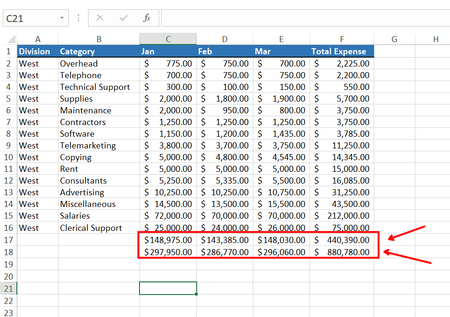

See for example Add with the help of VBA code. The AutomateTotalSUM macro shows how to avoid duplicate sums

Please check the VBA code :
Sub CreateRowSums()
Dim wsh As Worksheet
Dim lr As Long
Dim lc As Long
Dim LastRow As Long
Application.ScreenUpdating = False
For Each wsh In Worksheets
lr = wsh.Cells.Find(What:="*", SearchOrder:=xlByRows, SearchDirection:=xlPrevious).Row
lc = wsh.Cells.Find(What:="*", SearchOrder:=xlByColumns, SearchDirection:=xlPrevious).Column
wsh.Cells(2, lc).Resize(lr - 1).FormulaR1C1 = "=SUM(RC3:RC[-1])"
LastRow = wsh.Range("F1").End(xlDown).Row
If Not ActiveCell.HasFormula Then
wsh.Range("F" & LastRow + 1).Formula = "=SUM(F2:F" & LastRow & ")"
wsh.Range("C" & LastRow + 1).Formula = "=SUM(C2:C" & LastRow & ")"
wsh.Range("D" & LastRow + 1).Formula = "=SUM(D2:D" & LastRow & ")"
wsh.Range("E" & LastRow + 1).Formula = "=SUM(E2:E" & LastRow & ")"
End If
Next wsh
Application.ScreenUpdating = True
End Sub
after run the code, total is not repititive but when i insert total are not coming.
Sir, if you write VBA code, then it can easily understandable. Please help..?
Here is a updated attached file..
- HansVogelaarSep 03, 2022MVP
You're not really trying, are you?
Sub CreateRowSums() Dim wsh As Worksheet Dim lr As Long Dim lc As Long Dim LastRow As Long Application.ScreenUpdating = False For Each wsh In Worksheets lr = wsh.Cells.Find(What:="*", SearchOrder:=xlByRows, SearchDirection:=xlPrevious).Row lc = wsh.Cells.Find(What:="*", SearchOrder:=xlByColumns, SearchDirection:=xlPrevious).Column wsh.Cells(2, lc).Resize(lr - 1).FormulaR1C1 = "=SUM(RC3:RC[-1])" If Not wsh.Cells(lr, 3).HasFormula Then wsh.Cells(lr + 1, 3).Resize(, lc - 2).FormulaR1C1 = "=SUM(R2C:R[-1]C)" End If wsh.UsedRange.EntireColumn.AutoFit Next wsh Application.ScreenUpdating = True End Sub- ExcelSep 03, 2022Iron Contributor
Sir, i have tried many times, but it does not work.
But sir, Can you please explain this line :
If Not wsh.Cells(lr, 3).HasFormula Then
wsh.Cells(lr + 1, 3).Resize(, lc - 2).FormulaR1C1 = "=SUM(R2C:R[-1]C)"
End If
Please ?- HansVogelaarSep 03, 2022MVP
It's almost the same as the line that you already had. Instead of adding formulas at the end of each row to sum the cells in that row, it adds formulas at the bottom of each column to sum the cells in that column. But it only does so if the cell at the bottom of column 3 (i.e. column C) does not already have a formula, to avoid adding the formulas more than once.