Forum Discussion

MzDee
Dec 27, 2021Copper Contributor
auto notes showing
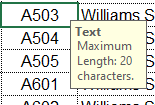
How can I make this note/comment go away. It only occurs in a couple of columns. It seemed to have started a couple of updates ago.
- Dec 27, 2021
That looks like the input message of a data validation rule.
Select the cells where this occurs.
On the Data tab of the ribbon, in the Data Tools group, click Data Validation.
Activate the Input Message tab.
Clear the check box 'Show input message when cell is selected'.
Click OK.

HansVogelaar
Dec 27, 2021MVP
That looks like the input message of a data validation rule.
Select the cells where this occurs.
On the Data tab of the ribbon, in the Data Tools group, click Data Validation.
Activate the Input Message tab.
Clear the check box 'Show input message when cell is selected'.
Click OK.

MzDee
Dec 27, 2021Copper Contributor
Thank you!!! You don't know how much this was driving me crazy EVERY time I used that column!