Forum Discussion

Assistance with PowerPivot Data Relational Models.
- Apr 16, 2018
Without that you pivot nothing and, in general, you don't need the pivot table. From data table you may combine one more table with all information.
Data->Existing connections, select Table1 and open. Right click on it, Table->Edit DAX. Here select DAX
and into expression put something like
EVALUATE
SUMMARIZE (
    Table1,
    Table1[Name],
    Table1[Address],
    Table2[Area]
   )
Result is
Please see attached.

Hi Coral,
Hard to say what exactly doesn't work without the sample. Here is my one. Creating the PivotTable if you use Data model as source
the result is like this
Please see attached.

Hi and Thank you so much for your comment.
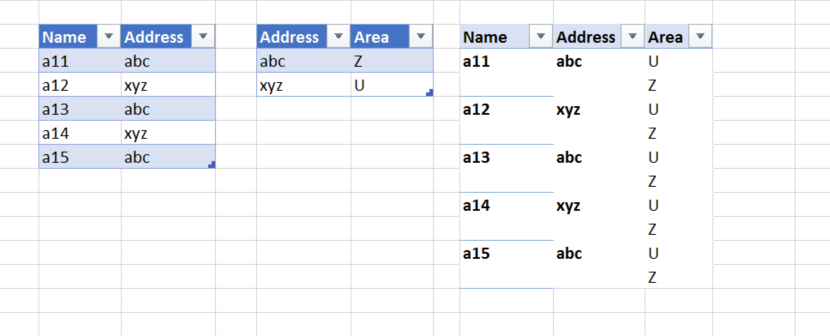
I was attempting to create a table that contains "Name" "Address" and "Area"
The problem is that it doesn't connect in the right way and I get a table with all the areas.
I attach a picture showing the table I receive.
Thank you so much again.
- Coral SteinbergApr 16, 2018Copper Contributor
I just noticed that I get the desired table only if I add a column of "count of name" or "count of address". I don't want that column and I don't understand why am I obliged to add it.
I attach a photo.
Thank you
- SergeiBaklanApr 16, 2018Diamond Contributor
Without that you pivot nothing and, in general, you don't need the pivot table. From data table you may combine one more table with all information.
Data->Existing connections, select Table1 and open. Right click on it, Table->Edit DAX. Here select DAX
and into expression put something like
EVALUATE
SUMMARIZE (
    Table1,
    Table1[Name],
    Table1[Address],
    Table2[Area]
   )
Result is
Please see attached.
- SergeiBaklanApr 16, 2018Diamond Contributor
Even better
Evaluate
ADDCOLUMNS (
    Table1,
    "Area", RELATED ( 'Table2'[Area] )
)