Forum Discussion

Add a new customer to a list of customers in a table
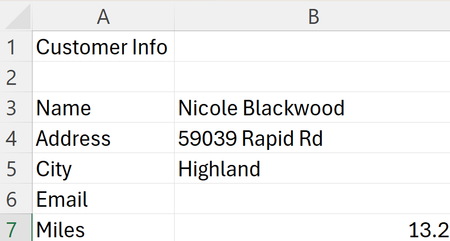

formular
=torow(B3:B7)
vba:
arr=transpose(range(b2:b7))
With Sheets("list")
r = .Range("a65536").End(3).Row + 1
.Cells(r, 1).Resize(1, 5) = arr
End With
- peiyezhuMay 28, 2024Bronze ContributorVBA script for Excel. Let's break it down step by step.
First, the line `arr=transpose(range(b2:b7))` is attempting to transpose the range `B2:B7`. Transposing a range means to switch its rows and columns. However, the syntax should be `Application.Transpose(.Range("B2:B7").Value)` if you are working with VBA and want to store the transposed values in the variable `arr`.
Next, the script seems to be trying to find the last used row in column A of the "list" sheet and then paste the transposed array `arr` starting from that row in the first column and extending across 5 columns.
Assuming the `transpose` part is corrected as suggested above, the code could be updated to achieve this:
```vba
Sub YourSubroutineName()
Dim arr As Variant
arr = Application.Transpose(Sheets("Sheet1").Range("B2:B7").Value)
With Sheets("list")
r = .Range("A" & .Rows.Count).End(xlUp).Row + 1
.Cells(r, 1).Resize(1, UBound(arr)) = arr
End With
End Sub
```
This modified code will find the last used row in column A of the "list" sheet and then paste the transposed array `arr` starting from that row in the first column and extending across 5 columns based on the size of the `arr` array. SeanHaynesJun 01, 2024Copper Contributor
@peiyezhu the code works, but I've changed things around a little.
First, I changed the "New Customer" sheet so there is no need to transpose cells. I like the data entry cells (B3-B11) to be spaced a bit so it's harder to accidentally tap on the incorrect cell when typing on my Surface Go's screen.
Second, for the "All Customers" sheet I've add a column named "Cust No" (customer number) so I can use use XLOOKUP to return a customer based on the customer number. Since customer numbers exist before new customers are added, the code adds a new customer to the first empty row after customer number 1000 (B1004), which is almost what I want. What code do I need to have a new customer (i.e. Nicole Blackwood) added to B5:F5, the next customer to C5:F5 and so on?
- peiyezhuJun 01, 2024Bronze Contributor
@peiyezhu the code works, but I've changed things around a little.
First, I changed the "New Customer" sheet so there is no need to transpose cells.
What do you mean no need to transpose cells?
All by hard coding like below:
arr[0]=[B3]
arr[1]=[B5]
arr[2]=[B7]
....
That is OK but not elegant for further maintain.
I like the data entry cells (B3-B11) to be spaced a bit
You can set a bigger number size to the height of each row rather than insert a blank row.
so it's harder to accidentally tap on the incorrect cell when typing on my Surface Go's screen.
What code do I need to have a new customer (i.e. Nicole Blackwood) added to B5:F5,
Sub Copy_To_Customer_List()
Dim arr As Variant
arr = Application.Transpose(Sheets("New Customer").Range("B3:B7").Value)
msgbox join(arr,",")
With Sheets("All Customers")'here changed to last row according to column B
'r = .Range("A" & .Rows.Count).End(xlUp).Row + 1r=.Range("B" & .Rows.Count).End(xlUp).Row + 1
'.Cells(r, 1).Resize(1, UBound(arr)) = arr'fill start from B column
.Cells(r, 2).Resize(1, UBound(arr)) = arr
End With
End Sub
 SeanHaynes95425May 29, 2024Copper Contributor
peiyezhu, this doesn't work. I adapted the code to use the name of my sheets ("New Customer" and "All Customers"), but nothing is copied to the bottom of the All Customers sheet/table -- is this code included below?
Sub Copy_To_Customer_List()
Dim arr As Variant
arr = Application.Transpose(Sheets("New Customer").Range("B3:B7").Value)With Sheets("All Customers")
r = .Range("A" & .Rows.Count).End(xlUp).Row + 1
.Cells(r, 1).Resize(1, UBound(arr)) = arr
End WithEnd Sub
- peiyezhuMay 29, 2024Bronze ContributorRe:but nothing is copied to the bottom
Does any error occur?
Sub Copy_To_Customer_List()
Dim arr As Variant
arr = Application.Transpose(Sheets("New Customer").Range("B3:B7").Value)
msgbox join(arr,",")
With Sheets("All Customers")
r = .Range("A" & .Rows.Count).End(xlUp).Row + 1
.Cells(r, 1).Resize(1, UBound(arr)) = arr
End With
End Sub
Have you tried below:
arr=transpose(range(b3:b7))
With Sheets("list")
r = .Range("a65536").End(3).Row + 1
.Cells(r, 1).Resize(1, 5) = arr
End With