Forum Discussion

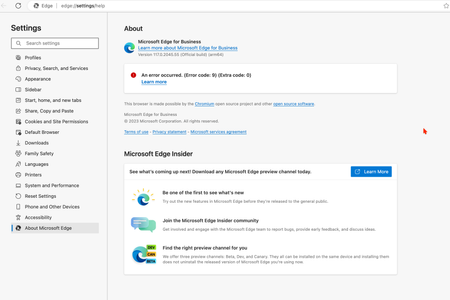
An error occurred. (Error code: 9) (Extra code: 0)
 Oct 17, 2023
CyrilYu run these commands would resolve the problem
sudo rm -rfv /Library/LaunchDaemons/com.microsoft.EdgeUpdater.*
sudo "/Applications/Microsoft Edge.app/Contents/Frameworks/Microsoft Edge Framework.framework/Versions/118.0.2088.46/Helpers/EdgeUpdater.app/Contents/MacOS/EdgeUpdater" --install --system --v=2
then restart edge browser, open `edge://settings/help`, problem should resolved
(found solution after extract MicrosoftEdge-118.0.2088.46.pkg and read scripts/postinstall)

While it may appear straightforward, I followed these steps, but unfortunately, they did not resolve the issue. Let me outline the actions I took:
1 used AppCleaner to completely uninstall Microsoft Edge.
2 then downloaded Microsoft Edge directly from the official Microsoft website.
3 manually checked the LaunchDaemons folder to ensure there were no remaining Edge files.
Finally, I executed the installation process for the Edge browser.
I want to emphasise that I confirmed the absence of the mentioned file in the folder and executed the second command as suggested."
Here is after running the commandStill getting the error

- FeejusOct 17, 2023Brass ContributorIn fact this issue is now new, this has happened twice. It seems the issue is related to something the dev team does.
https://techcommunity.microsoft.com/t5/discussions/macos-edge-beta-95-0-1020-9-update-now-showing-error-message-on/m-p/2799187
https://techcommunity.microsoft.com/t5/discussions/an-error-occurred-error-code-9-extra-code-0/m-p/3064903 - FeejusOct 17, 2023Brass ContributorI would greatly appreciate it if you could guide me on the steps I should take differently. I acknowledge that this solution has worked for some, as you've demonstrated, but it doesn't guarantee success for everyone. I followed the steps to uninstall it, and now my LaunchDaemons no longer contain any "Edge" files. I do have other Microsoft applications installed, such as OneDrive and Office, and they have "Login" items files.