Forum Discussion

The Employee Self-Service agent - how to find it

Thank you AurelienAtibard for the answer.
I reached out to Microsoft and was able to get access to the agent through Microsoft Marketplace.
If you search for "Employee Self Service Agent", you can find the "Employee Self-Service HR Agent" (preview). I was also granted access to the parent agent, which is not discoverable through search. To be honest, I don't fully understand the reasoning behind this, especially since that agent is not marked as a preview and available in PPAC.
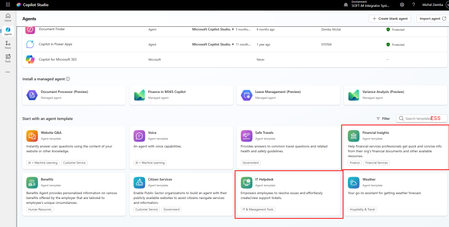
Another way to find and install both agents is through the Power Platform Admin Center by navigating to Manage → Dynamics 365 Apps, and then locating and installing the agent from there (see screenshot below). Once installed in the target environment, the agents appear under the "Install a managed agent" section, but they are also listed alongside other agents.
Nevertheless, after trying it out, I'm still a bit confused.
You cannot open the HR Agent in Copilot Studio unless you use the preview URL (copilotstudio.preview.microsoft.com). As shown in the screenshots, there are also no options to use tools or configure connections in the agent's settings.
While reviewing the documentation, I came across the "Install ServiceNow HRSD extension pack" section. If I understand it correctly, I need to contact Microsoft and have them enable this capability for my tenant before I can use it. Is that correct?
So far, I have built a separate agent that uses tools and a ServiceNow connection, but it seems Microsoft has taken a much more advanced approach than my initial implementation.
Has anyone successfully deployed this agent with ServiceNow HRSD integration? I'd appreciate hearing about your experience and any lessons learned.