Forum Discussion

The Employee Self-Service agent - how to find it
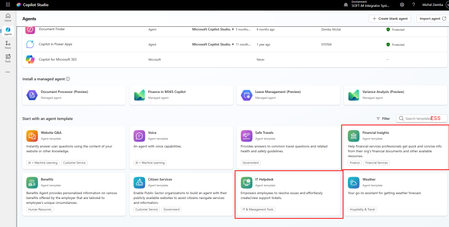

You are not doing anything wrong. The Employee Self-Service agent is simply not available to all tenants yet. Access is rolling out in waves, starting with managed customers and expanding to all customers over time. If you want access sooner, you need to reach out to your Microsoft account team. Small and mid-sized tenants without a dedicated account team just have to wait, which explains what you are seeing.
Also worth knowing: when the template does appear, you find it under Create then Managed Agents in Copilot Studio, not through a keyword search. The IT Helpdesk agent you installed is a completely separate template, which is why the ServiceNow HRSD topics are not there.
As for the GitHub Developer Kit, the YAML topics will keep breaking in isolation because they depend on shared variables, helper topics, flows, and connectors that only exist once the full ESS solution is properly installed. Copying topics into a blank agent is not enough.
The realistic options right now are to wait for broad rollout, or if this is for an active customer project, escalate through your Microsoft partner channel to request early access.
Full details here: https://learn.microsoft.com/microsoft-365/copilot/employee-self-service/overview