Forum Discussion

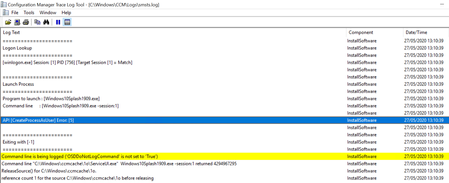
CreateProcessAsUser Error 5 - ServiceUI.exe

Elliot_the_Goose Hello Elliot, thanks for this. I am not seeing this statement anywhere in the MeM release notes though. Is this somehow intentionally not public information?
I am currently building a task sequence with a pop up solution which needs to be interactive and I am running into this very issue. But interesting part is that the pop up executed via ServiceUI.exe works on 1809 while it stops working after the OS gets upgraded to 1909 via the same Task sequence.
Are there any other possibilities to overcome this issue instead of trashing the whole framework and going to Windows 10 servicing?
Thanks,
Petr

Can you please put your syntax you're using to call ServiceUI in your task Sequence?
I have not had any issues with launching Service UI in my 1809 -> 1909 Task Sequence, before OR after the upgrade.
I'll often launch a command prompt to pause the TS at certain points for troubleshooting, and I've had no issues using this command:
ServiceUI.exe -process:tsprogressui.exe "%WINDIR%\System32\cmd.exe"
Just make sure you're not hiding the TS Progress UI.
- ShandiaakSep 25, 2020Copper Contributor
gwblok Hi, thanks for replying. Actually the reason to call ServiceUI.exe is because I have a custom pop up solution and independent progress bar, therefore show TS progress is disabled.. After talking to MS engineer we figured out that this error is caused by "timeout" settings of the task. At one point I have started setting timeouts for each command of the task sequence. Not realizing that might cause anything else, the error started appearing right after one of my two machines upgraded to 1909 and hence I suspected different behavior on two OS versions. No, surely not the case. It is the bloody timeout for a "run command line" task. Having it unchecked solved the issue.