Forum Discussion

Issues to install MECM 2509 (setup could not install sql rmo, configmgr installation)
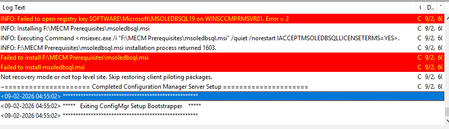

You’re installing MECM 2509 on Windows Server 2019, and Setup stops while launching msoledbsql.msi even though ODBC Driver 18.5 is installed. Those are different components: msodbcsql installs the ODBC driver, while msoledbsql installs Microsoft OLE DB Driver for SQL Server. Therefore, the ODBC version does not satisfy an OLE DB prerequisite. Keep ODBC 18 installed. From the same MECM installation media, run Setup Downloader into a new folder, then run setupdl.exe /VERIFY and review C:\ConfigMgrSetup.log. Next, run the downloaded x64 msoledbsql.msi interactively as administrator and capture a verbose MSI log; verify the OLE DB package’s required Visual C++ runtime is present. Check Installed apps for an existing OLE DB 18 or 19 package and its exact version, but do not delete MSI registry records or bypass Setup. If the refreshed package still fails, submit ConfigMgrSetup.log and the MSI log to Microsoft support.

oh Thank you so much for the explanation Jamony, mutch appreciated. I was finally able to solve the issue by installing the x86 VC redist so the MECM 2509 was successfully installed completely.