Forum Discussion

Objects in a Retention Policy populated by Adaptive Scopes
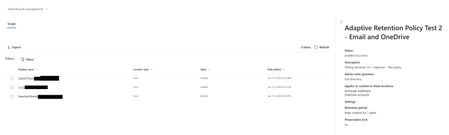

Ok. If it were that easy then they all would have been added to the policy at the same time when I created it. not in a span of nearly 20 hours. You can see that Dave was a member of the adaptive scope on 1/12, but did not get the policy applied to his account until nearly 20 hours after the first user was added. Between the first and second user there is a span of 7 hours. Between policy creation and first user was about 1-2 hours. I'm going to need to show that. I'm going to need to prove that users in the scope are in the policy. If something can be shown in a GUI and exported via the GUI, why can I not get that same information in PowerShell?

Neither policy distribution nor scope provisioning/changes are immediate processes, here's the relevant quote from the documentation:
It can take up to five days for the queries to fully populate and changes aren't immediate. Factor in this delay by waiting a few days before you add a newly created scope to a policy.
That said, my previous replies are indeed wrong/insufficient. After taking a closer look at an adaptive scope policy, I can see what you are referring to, and neither cmdlets mentioned above will give you this data. Afaik, there is no PowerShell equivalent of the endpoint used (https://purview.microsoft.com/apiproxy/gws/DlmServices/AdaptivePolicyReports('a06715ef-3e41-4991-a79b-da526933aac4')/Locations) and the only method to monitor the progress of policy applications seems to be via the Audit log. Outside of the UI, that is.
Here's what a sample audit log entry looks like:
RecordType   : DataGovernance
CreationDate : 26/01/26 20:12:14
UserIds      : 75c66a25-a1d9-4853-97c6-b56d70d2fcc6
Operations   : ApplicableAdaptivePolicyChange
AuditData    : {"CreationTime":"2026-01-26T20:12:14","Id":"14ed604f-5bb0-4193-b490-08de5d17327b","Operation":"ApplicableAdaptivePolicyChange","OrganizationId":"923712ba-352a-4eda-bece-09d0684d0cfb","
               RecordType":38,"UserKey":"75c66a25-a1d9-4853-97c6-b56d70d2fcc6","UserType":4,"Version":1,"Workload":"SecurityComplianceCenter","ObjectId":"ToBeRemoved@michev.info","UserId":"75c66a25-a
               1d9-4853-97c6-b56d70d2fcc6","ExtendedProperties":[{"Name":"AssociatedAdaptivePolicyIds","Value":"a06715ef-3e41-4991-a79b-da526933aac4"},{"Name":"DissociatedAdaptivePolicyIds","Value":"
               "},{"Name":"CorrelationId","Value":"47fe9801-f3eb-4cc6-af0a-d1f4b046c7eb"}],"ObjectType":"User"}
ResultIndex  : 1
ResultCount  : 1
Identity     : 14ed604f-5bb0-4193-b490-08de5d17327b
IsValid      : True
ObjectState  : Unchanged
So a query like this should do:
Search-UnifiedAuditLog -StartDate (Get-Date).AddDays(-1) -EndDate (Get-Date).AddDays(1) -Operations ApplicableAdaptivePolicyChange
- Raechel MoermondJan 28, 2026Brass Contributor
I've been able to mostly script this. basically, I get all members of all adaptive scope and then check the mailbox for an in-place hold. compare the GUID of the hold (taking off the first 3 and last 2 characters) to all the GUIDs of retention policies using an adaptive scope to determine which policy is being applied. Works great for mailboxes. And the implication is that if the mailbox has a policy applied, so too does the OneDrive. Because I cannot get the OneDrive hold without elevated permissions, and my customer is not going to want to give a service account the elevated permissions needed for that. so, at the end of the day - member of a scope, get policy applied from mailbox, and no errors on the policy means safe assumption that the policy is also applied to OneDrive.