Forum Discussion

Objects in a Retention Policy populated by Adaptive Scopes

Get-AdaptiveScope/Get-AdaptiveScopeMember give you that info: https://learn.microsoft.com/en-us/powershell/module/exchangepowershell/get-adaptivescopemembers?view=exchange-ps
Refer to the examples in the article for an "export" method as well.

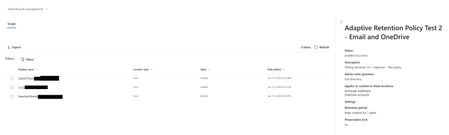
Those commands get me the adaptive scope members (second screenshot). What gets me the first screenshot? That is the Retention Policy and what time the members of the adaptive scope were added to the policy. I want the information when I click on the policy and I click on "policy details" from the flyout on the right. Those details are the folks it's applied to and the time they were added to the policy. Not to the adaptive scope (although that information is helpful too, but I could find the command for that).
- VasilMichevJan 23, 2026MVP
It's exactly that. They are not added/removed to the policy, but to the scope. You can run the cmdlets with -State Added/-State Removed parameters to get that list.
- Raechel MoermondJan 26, 2026Brass Contributor
Ok. If it were that easy then they all would have been added to the policy at the same time when I created it. not in a span of nearly 20 hours. You can see that Dave was a member of the adaptive scope on 1/12, but did not get the policy applied to his account until nearly 20 hours after the first user was added. Between the first and second user there is a span of 7 hours. Between policy creation and first user was about 1-2 hours. I'm going to need to show that. I'm going to need to prove that users in the scope are in the policy. If something can be shown in a GUI and exported via the GUI, why can I not get that same information in PowerShell?
- VasilMichevJan 27, 2026MVP
Neither policy distribution nor scope provisioning/changes are immediate processes, here's the relevant quote from the documentation:
It can take up to five days for the queries to fully populate and changes aren't immediate. Factor in this delay by waiting a few days before you add a newly created scope to a policy.
That said, my previous replies are indeed wrong/insufficient. After taking a closer look at an adaptive scope policy, I can see what you are referring to, and neither cmdlets mentioned above will give you this data. Afaik, there is no PowerShell equivalent of the endpoint used (https://purview.microsoft.com/apiproxy/gws/DlmServices/AdaptivePolicyReports('a06715ef-3e41-4991-a79b-da526933aac4')/Locations) and the only method to monitor the progress of policy applications seems to be via the Audit log. Outside of the UI, that is.
Here's what a sample audit log entry looks like:RecordType : DataGovernance CreationDate : 26/01/26 20:12:14 UserIds : 75c66a25-a1d9-4853-97c6-b56d70d2fcc6 Operations : ApplicableAdaptivePolicyChange AuditData : {"CreationTime":"2026-01-26T20:12:14","Id":"14ed604f-5bb0-4193-b490-08de5d17327b","Operation":"ApplicableAdaptivePolicyChange","OrganizationId":"923712ba-352a-4eda-bece-09d0684d0cfb"," RecordType":38,"UserKey":"75c66a25-a1d9-4853-97c6-b56d70d2fcc6","UserType":4,"Version":1,"Workload":"SecurityComplianceCenter","ObjectId":"ToBeRemoved@michev.info","UserId":"75c66a25-a 1d9-4853-97c6-b56d70d2fcc6","ExtendedProperties":[{"Name":"AssociatedAdaptivePolicyIds","Value":"a06715ef-3e41-4991-a79b-da526933aac4"},{"Name":"DissociatedAdaptivePolicyIds","Value":" "},{"Name":"CorrelationId","Value":"47fe9801-f3eb-4cc6-af0a-d1f4b046c7eb"}],"ObjectType":"User"} ResultIndex : 1 ResultCount : 1 Identity : 14ed604f-5bb0-4193-b490-08de5d17327b IsValid : True ObjectState : UnchangedSo a query like this should do:
Search-UnifiedAuditLog -StartDate (Get-Date).AddDays(-1) -EndDate (Get-Date).AddDays(1) -Operations ApplicableAdaptivePolicyChange